# Online Checkout (/docs/api-documentation/payment-apis/online-checkout)
##### Overview [#overview]
The **Online Checkout API** allows merchants to accept online payment for goods and services using:
* Mobile Money
* Bank Card
* Wallet (Hubtel, G-Money)
* GhQR
* Cash / Cheque
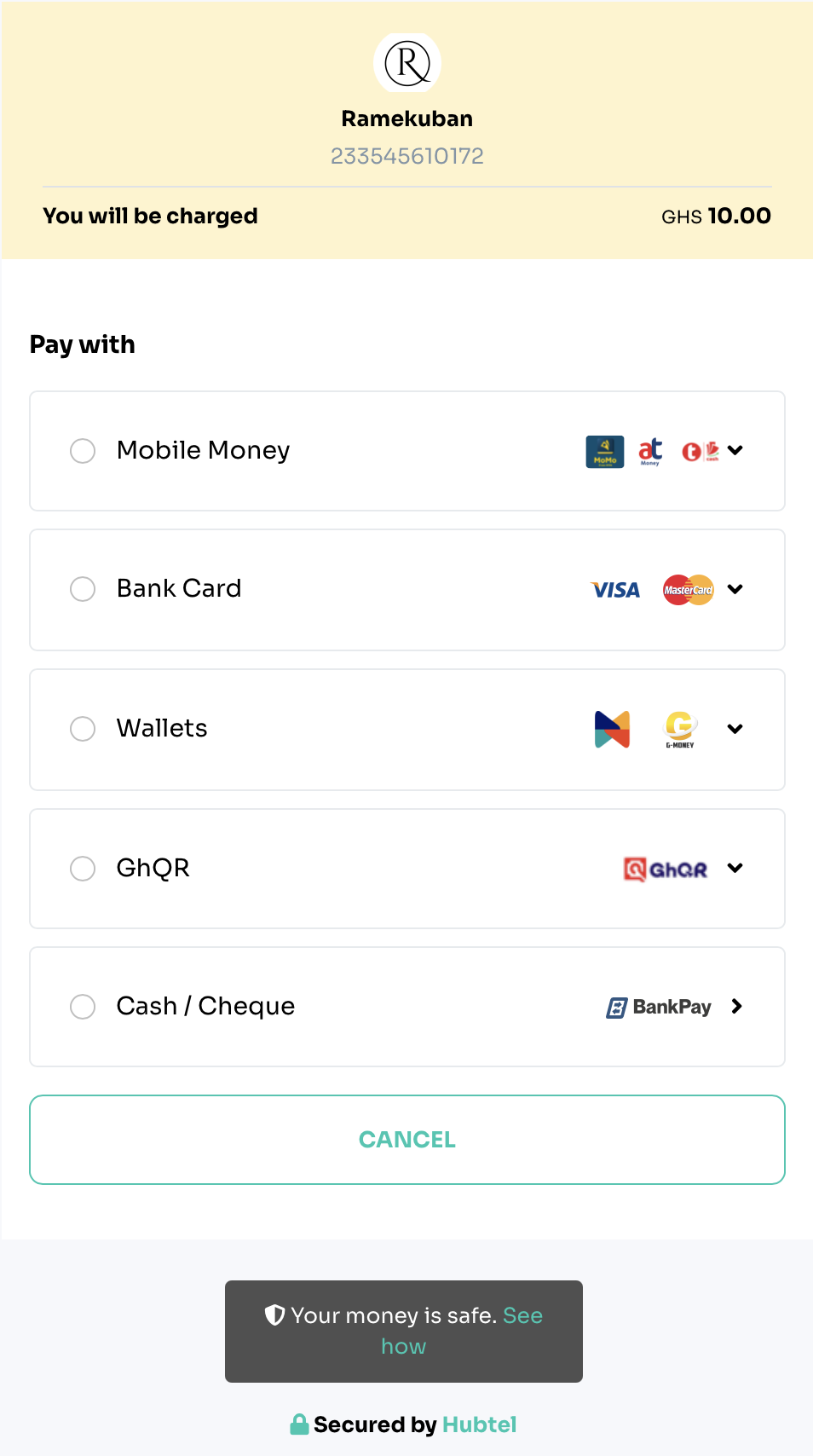
This API offers RESTful endpoints that integrate online payments into any application.
You may implement the Hubtel Online Checkout to:
* Redirect to the Hubtel Website to take payment - Redirect Checkout
* Take payment on your own website - Onsite Checkout
##### Redirect Checkout - How it Works [#redirect-checkout---how-it-works]
1. A customer arrives on your website and clicks on a pay button.
2. The customer is redirected to the Hubtel checkout page.
3. The customer selects how they wish to pay.
4. The customer verifies their identity by inputting their mobile number to receive an OTP.
5. When payment is completed, a success or failure notification is presented to the customer.
6. The customer is finally redirected back to your website via your return URL.
API Request Flow
 *Redirect Checkout Request Flow*
##### Onsite Checkout - How It Works [#onsite-checkout---how-it-works]
1. A customer arrives on your website and clicks on a pay button.
2. Your website loads up the Hubtel Payment page within your website preferably in an iframe.
3. The customer selects how they wish to make payment.
4. The customer verifies their identity by entering their mobile number to receive an OTP or scanning a QR Code with their Hubtel app.
5. When payment is completed, a success or failure notification is presented to the customer.
API Request Flow
 *Onsite Checkout Request Flow*
> **Note**
> In instances where a merchant does not receive the final status of the transaction **after five (5) minutes** from Hubtel, it is **mandatory** to perform a status check using the Transaction Status Check API to determine the final status of the transaction.
##### API Reference [#api-reference]
The **Online Checkout API** allows merchants to accept online payment for goods and services.
To initiate a transaction, send an HTTP **POST** request to the below URL with the required parameters.
| | |
| ------------ | ---------------------------------------------------------------------------------------------- |
| API Endpoint | [https://payproxyapi.hubtel.com/items/initiate](https://payproxyapi.hubtel.com/items/initiate) |
| Request Type | **POST** |
| Content Type | **JSON** |
###### REQUEST PARAMETERS [#request-parameters]
| Parameter | Type | Requirement | Description |
| --------------------- | ------ | ----------- | -------------------------------------------------------------------------------------------------------------------------------------------- |
| totalAmount | Float | Mandatory | Specifies the total amount expected to be paid for the items being purchased. **NB**: Only 2 decimal places is allowed **E.g.: 0.50**. |
| description | String | Mandatory | A brief description about the item to be purchased. Special characters are not accepted. |
| callbackUrl | String | Mandatory | The callback URL expected to receive the final status of the payment. |
| returnUrl | String | Mandatory | The merchant website URL where the customer should be redirected to after payment. |
| merchantAccountNumber | String | Mandatory | This refers to the merchant's **Collection Account Number**. Find yours [here](/docs/get-started/programmable-api-keys?curr_idx=3). |
| cancellationUrl | String | Mandatory | The merchant website URL where the customer should be redirected to after cancellation. |
| clientReference | String | Mandatory | A unique string identifying the transaction. Useful for reference purposes. It cannot be empty but must have a **maximum of 32 characters**. |
| payeeName | String | Optional | This refers to the name of the Payee. |
| payeeMobileNumber | String | Optional | This refers to the mobile number of the Payee. |
| payeeEmail | String | Optional | This refers to the Email of the Payee. |
###### RESPONSE PARAMETERS [#response-parameters]
| Parameter | Type | Description |
| ----------------- | ------ | -------------------------------------------------------------------------------------------- |
| checkoutUrl | String | A payee should be redirected to this link to make payment. |
| checkoutId | String | Unique hubtel reference for the transaction. |
| clientReference | String | This is a unique string identifying the transaction. Same as what was passed in the request. |
| checkoutDirectUrl | String | A payee can make payment on the same page the request was made from with this URL. |
###### SAMPLE REQUEST [#sample-request]
**HTTP**
```http
POST https://payproxyapi.hubtel.com/items/initiate
Host: payproxyapi.hubtel.com
Accept: application/json
Content-Type: application/json
Authorization: Basic endjeOBiZHhza24=
Cache-Control: no-cache
{
"totalAmount": 100,
"description": "Book Shop Checkout",
"callbackUrl": "https://webhook.site/8b4bbd0a-5f98-4b3d-abbe-b9b49767f7d5",
"returnUrl": "http://hubtel.com/online",
"merchantAccountNumber": "11684",
"cancellationUrl": "http://hubtel.com/online",
"clientReference": "inv0012"
}
```
**cURL**
```bash
curl --location 'https://payproxyapi.hubtel.com/items/initiate' \
--header 'Content-Type: application/json' \
--header 'Authorization: Basic endjeOBiZHhza24=' \
--data '{
"totalAmount": 100,
"description": "Book Shop Checkout",
"callbackUrl": "https://webhook.site/8b4bbd0a-5f98-4b3d-abbe-b9b49767f7d5",
"returnUrl": "http://hubtel.com/online",
"merchantAccountNumber": "11684",
"cancellationUrl": "http://hubtel.com/online",
"clientReference": "inv0012"
}'
```
**PHP**
```php
'https://payproxyapi.hubtel.com/items/initiate',
CURLOPT_RETURNTRANSFER => true,
CURLOPT_ENCODING => '',
CURLOPT_MAXREDIRS => 10,
CURLOPT_TIMEOUT => 0,
CURLOPT_FOLLOWLOCATION => true,
CURLOPT_HTTP_VERSION => CURL_HTTP_VERSION_1_1,
CURLOPT_CUSTOMREQUEST => 'POST',
CURLOPT_POSTFIELDS =>'{
"totalAmount": 100,
"description": "Book Shop Checkout",
"callbackUrl": "https://webhook.site/8b4bbd0a-5f98-4b3d-abbe-b9b49767f7d5",
"returnUrl": "http://hubtel.com/online",
"merchantAccountNumber": "11684",
"cancellationUrl": "http://hubtel.com/online",
"clientReference": "inv0012"
}',
CURLOPT_HTTPHEADER => array(
'Content-Type: application/json',
'Authorization: Basic endjeOBiZHhza24='
),
));
$response = curl_exec($curl);
curl_close($curl);
echo $response;
```
**Python**
```bash
import requests
import json
url = "https://payproxyapi.hubtel.com/items/initiate"
payload = json.dumps({
"totalAmount": 100,
"description": "Book Shop Checkout",
"callbackUrl": "https://webhook.site/8b4bbd0a-5f98-4b3d-abbe-b9b49767f7d5",
"returnUrl": "http://hubtel.com/online",
"merchantAccountNumber": "11684",
"cancellationUrl": "http://hubtel.com/online",
"clientReference": "inv0012"
})
headers = {
'Content-Type': 'application/json',
'Authorization': 'Basic endjeOBiZHhza24='
}
response = requests.request("POST", url, headers=headers, data=payload)
print(response.text)
```
**JS**
```javascript
const myHeaders = new Headers();
myHeaders.append("Content-Type", "application/json");
myHeaders.append("Authorization", "Basic endjeOBiZHhza24=");
const raw = JSON.stringify({
"totalAmount": 100,
"description": "Book Shop Checkout",
"callbackUrl": "https://webhook.site/8b4bbd0a-5f98-4b3d-abbe-b9b49767f7d5",
"returnUrl": "http://hubtel.com/online",
"merchantAccountNumber": "11684",
"cancellationUrl": "http://hubtel.com/online",
"clientReference": "inv0012"
});
const requestOptions = {
method: "POST",
headers: myHeaders,
body: raw,
redirect: "follow"
};
fetch("https://payproxyapi.hubtel.com/items/initiate", requestOptions)
.then((response) => response.text())
.then((result) => console.log(result))
.catch((error) => console.error(error));
```
###### SAMPLE RESPONSE [#sample-response]
```js
{
"responseCode": "0000",
"status": "Success",
"data": {
"checkoutUrl": "https://pay.hubtel.com/7569a11e8b784f21baa9443b3fce31ed",
"checkoutId": "7569a11e8b784f21baa9443b3fce31ed",
"clientReference": "inv0012",
"message": "",
"checkoutDirectUrl": "https://pay.hubtel.com/7569a11e8b784f21baa9443b3fce31ed/direct"
}
}
```
##### Checkout Callback [#checkout-callback]
You will need to implement a callback endpoint on your server to receive payment and order notification statuses.
> **Note**
> Businesses that want to add an extra layer of security to ensure callbacks reach their endpoint securely can whitelist Hubtel’s callback IP address: **108.129.40.25**
###### SAMPLE CALLBACK [#sample-callback]
```js
{
"ResponseCode": "0000",
"Status": "Success",
"Data": {
"CheckoutId": "59e2fbbff4e443b98e09346881ac7e9a",
"SalesInvoiceId": "e96ccfb4746045bba13f425bd573a31c",
"ClientReference": "Kaks545253",
"Status": "Success",
"Amount": 0.5,
"CustomerPhoneNumber": "233242825109",
"PaymentDetails": {
"MobileMoneyNumber": "233242825109",
"PaymentType": "mobilemoney",
"Channel": "mtn-gh"
},
"Description": "The MTN Mobile Money payment has been approved and processed successfully."
}
}
```
##### Transaction Status Check [#transaction-status-check]
It is **mandatory** to implement the **Transaction Status Check API** as it allows merchants to check for the status of a transaction in rare instances where a merchant does not receive the final status of the transaction from Hubtel **after five (5) minutes**.
To check the status of a transaction, send an HTTP **GET** request to the below URL, with either one or more unique transaction identifiers as parameters.
It is also **mandatory** to parse your **Collection Account Number** for Status Check requests in the endpoint.
Find your **Collection Account Number** [here](/docs/get-started/programmable-api-keys?curr_idx=3).
> **Note**
> Only requests from whitelisted IP(s) can reach the endpoint. Requests from IP addresses that have not been whitelisted will return a **403 Forbidden** error response or a **timeout**. Submit your public IP(s) to your Retail Systems Engineer to be whitelisted.
>
> We permit a maximum of 4 IP addresses per service.
| | |
| ------------ | -------------------------------------------------------------------------------------------------------------------------------------------------------------------------------- |
| API Endpoint | [https://api-txnstatus.hubtel.com/transactions/\{'\{Collection_Account_Number}'}/status](https://api-txnstatus.hubtel.com/transactions/\{'\{Collection_Account_Number}'}/status) |
| Request Type | **GET** |
| Content Type | **JSON** |
###### REQUEST PARAMETERS [#request-parameters-1]
| Parameter | Type | Requirement | Description |
| -------------------- | ------ | --------------------- | ------------------------------------------------------------------------- |
| clientReference | String | Mandatory (preferred) | The client reference of the transaction specified in the request payload. |
| hubtelTransactionId | String | Optional | Transaction ID from Hubtel after successful payment. |
| networkTransactionId | String | Optional | The transaction reference from the mobile money provider. |
> **Note**
> Although either one of the unique transaction identifiers above could be passed as parameters,
> **clientReference** is recommended to be used often.
###### SAMPLE REQUEST [#sample-request-1]
**HTTP**
```http
GET /transactions/11684/status?clientReference=inv0012 HTTP/1.1
Host: api-txnstatus.hubtel.com
Authorization: Basic endjeOBiZHhza24==
```
**cURL**
```bash
curl --location 'https://api-txnstatus.hubtel.com/transactions/11684/status?clientReference=inv0012' \
--header 'Authorization: Basic endjeOBiZHhza24=='
```
**PHP**
```php
'https://api-txnstatus.hubtel.com/transactions/11684/status?clientReference=inv0012',
CURLOPT_RETURNTRANSFER => true,
CURLOPT_ENCODING => '',
CURLOPT_MAXREDIRS => 10,
CURLOPT_TIMEOUT => 0,
CURLOPT_FOLLOWLOCATION => true,
CURLOPT_HTTP_VERSION => CURL_HTTP_VERSION_1_1,
CURLOPT_CUSTOMREQUEST => 'GET',
CURLOPT_HTTPHEADER => array(
'Authorization: Basic endjeOBiZHhza24=='
),
));
$response = curl_exec($curl);
curl_close($curl);
echo $response;
```
**Python**
```bash
import requests
url = "https://api-txnstatus.hubtel.com/transactions/11684/status?clientReference=inv0012"
payload = {}
headers = {
'Authorization': 'Basic endjeOBiZHhza24=='
}
response = requests.request("GET", url, headers=headers, data=payload)
print(response.text)
```
**JS**
```javascript
const myHeaders = new Headers();
myHeaders.append("Authorization", "Basic endjeOBiZHhza24==");
const requestOptions = {
method: "GET",
headers: myHeaders,
redirect: "follow"
};
fetch("https://api-txnstatus.hubtel.com/transactions/11684/status?clientReference=inv0012", requestOptions)
.then((response) => response.text())
.then((result) => console.log(result))
.catch((error) => console.error(error));
```
###### RESPONSE PARAMETERS [#response-parameters-1]
| Parameter | Type | Description |
| --------------------- | ------- | -------------------------------------------------------------------------------------------------------------- |
| message | String | The description of response received from the API that is related to the ResponseCode. |
| responseCode | String | The response code of the API after the request. |
| data | Object | An object containing the required data response from the API. |
| date | String | Date of the transaction |
| status | String | Status of the transaction i.e.: **Paid**, **Unpaid** or **Refunded**. |
| transactionId | String | The unique ID used to identify a Hubtel transaction (**from Hubtel**). |
| externalTransactionId | String | The transaction reference from the mobile money provider (**from Telco**). |
| paymentMethod | String | The mode of payment. |
| clientReference | String | The reference ID that is initially provided by the client/API user in the request payload (**from merchant**). |
| currencycode | String | Currency of the transaction; could be **null**. |
| amount | Float | The transaction amount. |
| charges | Float | The charge/fee for the transaction. |
| amountAfterCharges | Float | The transaction amount after charges/fees deduction. |
| isFulfilled | Boolean | Whether service was fulfilled; could be **null**. |
###### SAMPLE RESPONSE (Paid) [#sample-response-paid]
```js
{
"message": "Successful",
"responseCode": "0000",
"data": {
"date": "2024-04-25T21:45:48.4740964Z",
"status": "Paid",
"transactionId": "7fd01221faeb41469daec7b3561bddc5",
"externalTransactionId": "0000006824852622",
"paymentMethod": "mobilemoney",
"clientReference": "inv0012",
"currencyCode": null,
"amount": 0.1,
"charges": 0.02,
"amountAfterCharges": 0.08,
"isFulfilled": null
}
}
```
###### SAMPLE RESPONSE (Unpaid) [#sample-response-unpaid]
```js
{
"message": "Successful",
"responseCode": "0000",
"data": {
"date": "2024-04-25T21:45:48.4740964Z",
"status": "Unpaid",
"transactionId": "7fd01221faeb41469daec7b3561bddc5",
"externalTransactionId": "0000006824852622",
"paymentMethod": "mobilemoney",
"clientReference": "inv0012",
"currencyCode": null,
"amount": 0.1,
"charges": 0.02,
"amountAfterCharges": 0.08,
"isFulfilled": null
}
}
```
##### Response Codes [#response-codes]
The Hubtel Sales API uses standard HTTP error reporting. Successful requests return HTTP status codes in the 2xx. Failed requests return status codes in 4xx and 5xx. Response codes are included in the JSON response body, which contain information about the response.
| Response Code | Description | Required Action |
| ------------- | ----------------------------------------------------------------------------------------------------------------------------------------------------------------------------------------------------------------------------------------------------------------------------------------------------------------------------------------------------------------------------------------------------------------------------------------- | ----------------------------------------------------------------------------------------------------------------------------------------------------------------------------------------------------------------------------------------------------- |
| 0000 | This ResponseCode in the initial response means the request has been accepted, you can proceed with the transaction with any of the URLs provided in this initial response. | None |
| 0000 | This ResponseCode in the callback means the transaction has been processed successfully. | None |
| 0005 | There was an HTTP failure/exception when reaching the payment partner | The transaction state is not known. Please contact your Retail Systems Engineer to confirm the status of this transaction. |
| 2001 | • Transaction failed due to an error with the Payment Processor. Please review your request or retry in a few minutes
• The MTN Mobile Money user has reached counter or balance limits, has insufficient funds or is missing permissions.
• MTN Exception: Account Holder with FRI Not Found
• Transaction id is invalid
• Decline - General decline of the card. No other information provided by the issuing bank. | • Customer either entered no or invalid PIN
• Mobile network not able to parse your request
• USSD session timeout
• Having strange characters (&\*!%@) in your description
• Ensure that the number provided matches the channel |
| 4000 | Validation errors | Validation errors. Something is not quite right with this request. Please check again. |
| 4070 | We're unable to complete this payment at the moment. Please try again later. Fees not set for given conditions. | Ensure you are passing the required minimum amount or contact your Hubtel relationship manager to setup fees for your account if error persists. |