
API Documentation
Programmable services and USSD integration.
Overview
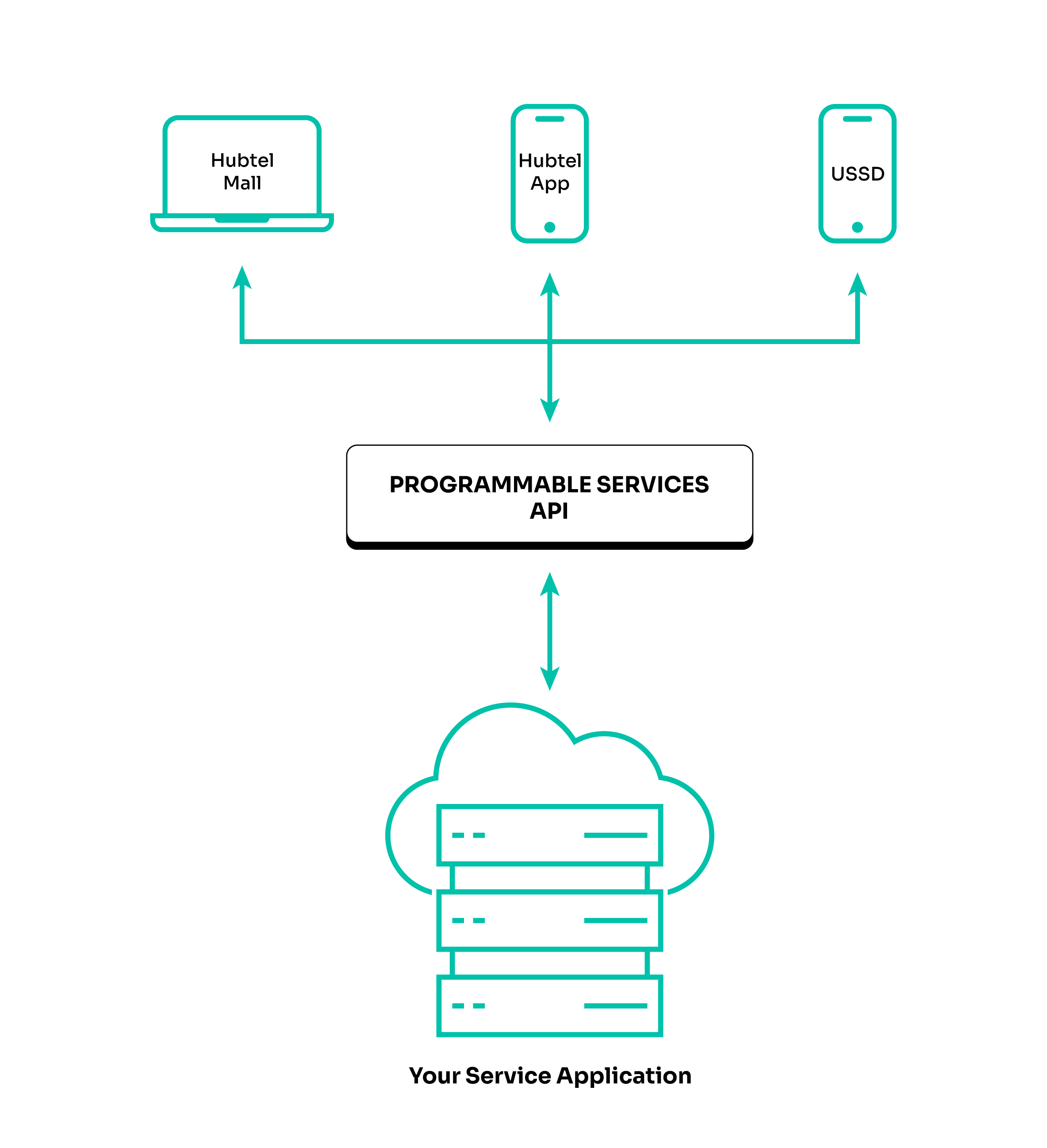
The Hubtel Programmable Services API is designed to serve as a medium through which services being offered by businesses are made available for customers to purchase on the Hubtel platform via USSD, Hubtel App and the Web Mall.
With a single integration, services will be available for purchase on the:
- USSD
- Hubtel App on Android and iOS
- Webstore
This makes it easier for businesses to reach a range of customers with their services.
How the API works
How to integrate the API
To integrate the Programmable Services API, follow these three simple steps:
- Develop a USSD application.
Using the Programmable Services API Reference here, develop and host your application.
- Add your service to your Hubtel account
To add your service, click here and provide your service interaction and service fulfilment URLs. Scroll down for further clarification on these URLs.
- Link to USSD code
After adding the service, request a USSD code and attach the service you have created to the code.
Note
Attaching the service to the USSD code can only be done on the Merchant Dashboard.
Core Features Of The Programmable Services API
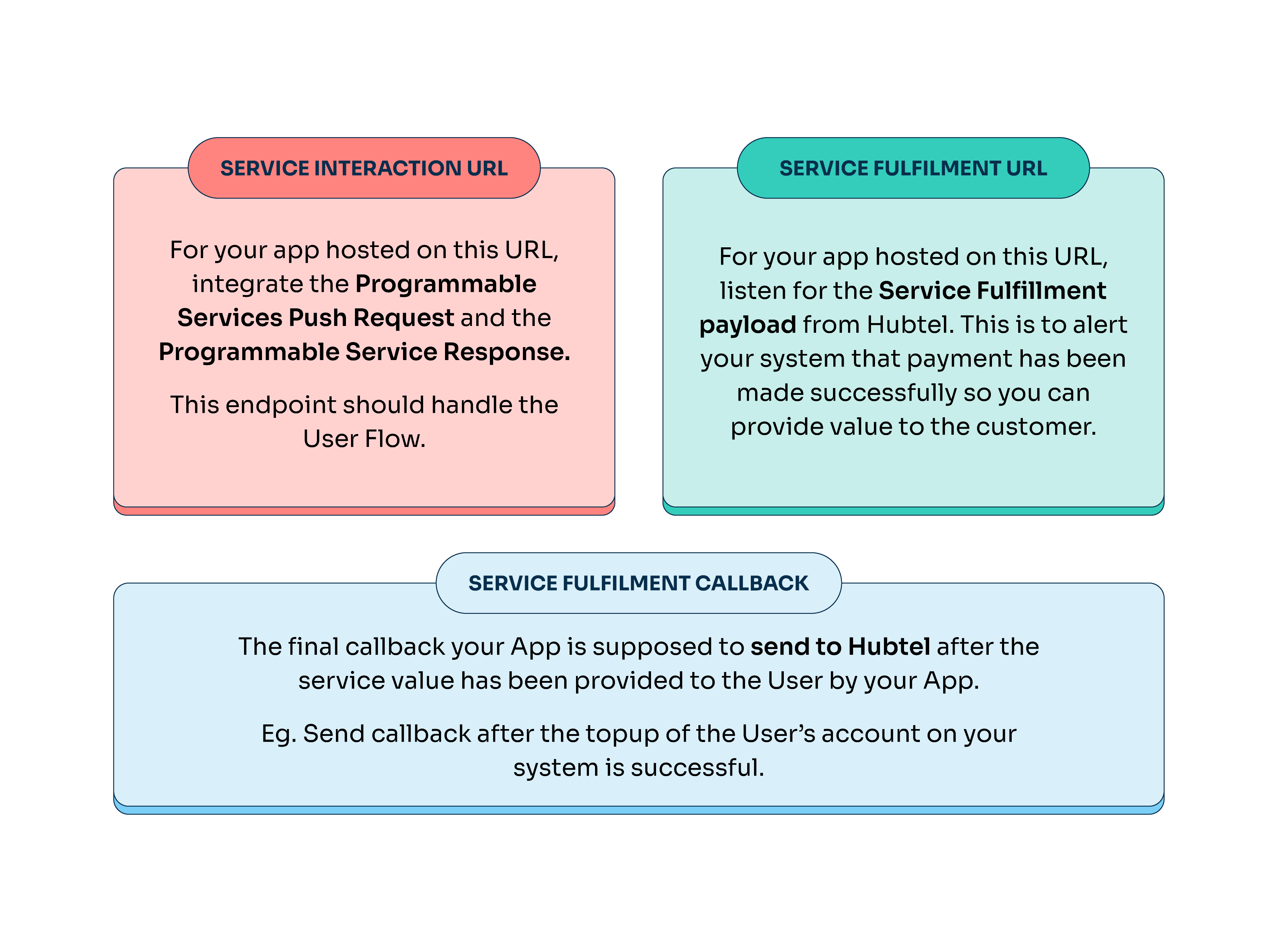
The Hubtel Programmable Services API interacts with your hosted app with two key functionalities designed to provide customers with the best user experience:
- Service Interaction URL: Allows users to interact dynamically with your service application based on your own pre-designed flows.
- Service Fulfilment URL: This URL is where requests are sent to, for the fulfilment of the service value after the user has made payment for the transaction.
Business IP Whitelisting
You must share your public IP address with your Retail System Engineer for whitelisting.
Note
The service fulfillment callback endpoint is not public hence an IP whitelisting will be required before you can send a service fulfillment callback to Hubtel.
Also, Businesses seeking to add an extra layer of security to their service fulfillment payloads from Hubtel can whitelist Hubtel’s service fulfillment IP addresses: 52.50.116.54, 18.202.122.131, 52.31.15.68.
API Reference
The Hubtel Programmable Services API pushes service requests to the service URLs you specify for that service in your Hubtel Account.
Your application will need to respond to the Push Service Request which has been outlined in the reference below. Please see the expected response below.
PUSH REQUEST
This is the request which Hubtel will send to your Service Interaction URL when a user dials your USSD code or selects your service on the Hubtel App or Web Mall.
| Parameter | Type | Description |
|---|---|---|
| Type | String | This stipulates the type of G.S request. Possible values are: “Initiation” – Indicates the beginning of a session (first message in the session). “Response” – indicates the subsequent response in an already existing session. “Timeout” – indicates that the session was cancelled by the user. |
| Message | String | Represents the actual text entered by the User. For USSD Channels, this will represent the USSD string entered by the subscriber during initiation. |
| ServiceCode | String | This represents either the USSD shortcode dialed. eg: "711*2". |
| Operator | String | This indicates the network operator of the user. Possible values are: "tigo", "airtel", "mtn", "vodafone". |
| ClientState | String | It represents data that the service application asked the API to send from the previous request. This data is only sent in the current request and is then discarded. |
| Mobile | String | This represents the phone number of the user dialing the code or selecting the service. |
| SessionId | String | This represents a unique identifier for the current programmable service session. |
| Sequence | Int | Indicates the position of the current message in the session. |
| Platform | String | This represents the actual platform channel being used for the Programmable service session. Possible values: "USSD", "Webstore", "Hubtel-App". Note: Betting companies wishing to be on the Hubtel App and Webstore must make provisions to handle all three platforms. |
RESPONSE PARAMETERS
This is the response your application is expected to provide to the push request from Hubtel.
| Parameter | Type | Requirement | Description |
|---|---|---|---|
| SessionId | String | Mandatory | This represents a unique identifier for the current Programmable services session. |
| Type | String | Mandatory | This stipulates the type of response from the application. Possible values are: “response” – indicates the subsequent response in an already existing session. “release” – indicates that the application is ending the session. “AddToCart” – indicates that the application is ending the session for the data to be sent to checkout for payment. |
| Message | String | Mandatory | Represents the actual text to be shown to a USSD User. A “\n” represents a new line in the text. Options are connoted by text. Eg: “\n1. Confirm”. |
| Mask | String | Optional | Indicates that the current message is masked. |
| Item | Object | Optional | Contains data that is sent during the AddToCart type response for payment from the User. For other response types, it must be empty. |
| ServiceCode | String | Optional | Can be used to pass back the service code by the Service Application. |
| Label | String | Mandatory | Represents the title message which will be displayed to a user using the Web or Mobile channels. It is meant to provide a richer user experience for such channels. |
| DataType | String | Mandatory | Represents the data type which can be used by the Web or Mobile Channels for a richer user experience. These data types can be: “display”: this is used when a message is to be displayed. “input”: this is used when an input is required of the user. |
| FieldType | Object | Mandatory | "text" - This gives a simple text box and allows the user to type with an alphanumeric keyboad when using mobile. "phone" - This allows the user to type in a phone number with all needed validations. "email" - This allows the User to type in an email address with an email keyboard. "number" - This allows the User to type in a whole number with a numeric keyboard. "decimal" - This gives a Numeric keyboard and allows for the user to type in a decimal number. , "textarea" - This shows a big text field for the user. |
| Sequence | Int | Optional | Indicates the position of the current message in the session. |
| ClientState | String | Optional | It represents data that the service application asked the API to send from the previous request. This data is only sent in the current request and is then discarded. |
Note
Do not include special characters in the Message parameter of your response body (E.g. É)
The error message, "The response from the provider of this service is invalid. Error: UUE", indicates that the response body from your Service Interaction URL is not in the expected format.
Sample USSD flow
SAMPLE REQUEST FROM HUBTEL
{
  "Type": "Initiation",
  "Mobile": "233200585542",
  "SessionId": "3c796dac28174f739de4262d08409c51",
  "ServiceCode": "713",
  "Message": "*713#",
  "Operator": "vodafone",
  "Sequence": 1,
  "ClientState": "",
  "Platform": "USSD"
}
SAMPLE RESPONSE FROM YOUR APP
{
  "SessionId": "3c796dac28174f739de4262d08409c51",
  "Type": "response",
  "Message": "Welcome to RSE Inc.\n1. Buy Airtime & Data\n3. Send Money\n6. My Balance\n",
  "Label": "Welcome page",
  "ClientState": "100",
  "DataType": "input",
  "FieldType": "text"
}
SAMPLE REQUEST FROM HUBTEL
{
  "Type": "Response",
  "Mobile": "233200585542",
  "SessionId": "3c796dac28174f739de4262d08409c51",
  "ServiceCode": "713",
  "Message": "2",
  "Operator": "vodafone",
  "Sequence": 2,
  "ClientState": "100",
  "Platform": "USSD"
}
SAMPLE RESPONSE FROM YOUR APP
{
  "SessionId": "3c796dac28174f739de4262d08409c51",
  "Type": "response",
  "Message": "How much do you want to send?",
  "Label": "amount",
  "ClientState": "200",
  "DataType": "input",
  "FieldType": "decimal"
}
SAMPLE REQUEST FROM HUBTEL
{
  "Type": "Response",
  "Mobile": "233200585542",
  "SessionId": "3c796dac28174f739de4262d08409c51",
  "ServiceCode": "713",
  "Message": "150.5",
  "Operator": "vodafone",
  "Sequence": 3,
  "ClientState": "200",
  "Platform": "USSD"
}
SAMPLE RESPONSE FROM YOUR APP
Note
The AddToCart payload is used to initiate payment.
{
  "SessionId": "3c796dac28174f739de4262d08409c51",
  "Type": "AddToCart",
  "Message": "The request has been submitted. Please wait for a payment prompt soon",
  "Item": {
    "ItemName": "Send Money",
    "Qty": 1,
    "Price": 150.5
  },
  "Label": "The request has been submitted. Please wait for a payment prompt soon",
  "DataType": "display",
  "FieldType": "text"
}
SAMPLE SERVICE FULFILLMENT
This is the request payload that Hubtel will send to your Service Fulfillment URL after payment has been made successfully.
{
  "SessionId": "3c796dac28174f739de4262d08409c51",
  "OrderId": "ac3307bcca7445618071e6b0e41b50b5",
  "ExtraData": {},
  "OrderInfo": {
    "CustomerMobileNumber": "233200585542",
    "CustomerEmail": null,
    "CustomerName": "John Doe",
    "Status": "Paid",
    "OrderDate": "2023-11-06T15:16:50.3581338+00:00",
    "Currency": "GHS",
    "BranchName": "Haatso",
    "IsRecurring": false,
    "RecurringInvoiceId": null,
    "Subtotal": 151.50,
    "Items": [
      {
        "ItemId": "5b8945940e1247489e34e756d8fc2dbb",
        "Name": "Send Money",
        "Quantity": 1,
        "UnitPrice": 150.5
      }
    ],
    "Payment": {
      "PaymentType": "mobilemoney",
      "AmountPaid": 151.50,
      "AmountAfterCharges": 150.5,
      "PaymentDate": "2023-11-06T15:16:50.3581338+00:00",
      "PaymentDescription": "The MTN Mobile Money payment has been approved and processed successfully.",
      "IsSuccessful": true
    }
  }
}
SERVICE FULFILLMENT CALLBACK
This is the request payload that your application sends to Hubtel after service has been rendered to the customer successfully.
Note
Service Fulfillment Callback must be sent within one hour of receiving the service fulfillment.
https://gs-callback.hubtel.com:9055/callbackSAMPLE REQUEST (Successful)
POST /callback HTTP/1.1
Host: gs-callback.hubtel.com:9055
Accept: application/json
Content-Type: application/json
Cache-Control: no-cache

{
  "SessionId":"3c796dac28174f739de4262d08409c51",
  "OrderId": "ac3307bcca7445618071e6b0e41b50b5",
  "ServiceStatus":"success",
  "MetaData":null
}
Transaction Status Check
It is mandatory to implement the Transaction Status Check API as it allows merchants to check for the status of a transaction in rare instances where a merchant does not receive the final status of the transaction from Hubtel after five (5) minutes.
To check the status of a transaction, send an HTTP GET request to the below URL, with either one or more unique transaction identifiers as parameters.
It is also mandatory to parse your Collection Account Number for Status Check requests in the endpoint. Find your Collection Account Number here.
Note
Only requests from whitelisted IP(s) can reach the endpoint. Submit your public IP(s) to your Retail Systems Engineer to be whitelisted.
https://api-txnstatus.hubtel.com/transactions/{Collection_Account_Number}/statusREQUEST PARAMETERS
| Parameter | Type | Requirement | Description |
|---|---|---|---|
| clientReference | String | Mandatory (preferred) | The client reference or SessionId of the transaction specified in the request payload. |
| hubtelTransactionId | String | Optional | Transaction ID from Hubtel after successful payment. |
| networkTransactionId | String | Optional | The transaction reference from the mobile money provider. |
Note
Although either one of the unique transaction identifiers above could be passed as parameters, clientReference is recommended to be used often. Pass the SessionId as the value.
SAMPLE REQUEST
GET /transactions/11684/status?clientReference=0c987dbb0cc64501b19812d99b859885 HTTP/1.1
Host: api-txnstatus.hubtel.com
Authorization: Basic QmdfaWghe22NU6bXVhaHdpYW8pfQ==
RESPONSE PARAMETERS
| Parameter | Type | Description |
|---|---|---|
| message | String | The description of response received from the API that is related to the ResponseCode. |
| responseCode | String | The response code of the API after the request. |
| data | Object | An object containing the required data response from the API. |
| date | String | Date of the transaction |
| status | String | Status of the transaction i.e.: Paid, Unpaid or Refunded. |
| transactionId | String | The unique ID used to identify a Hubtel transaction (from Hubtel). |
| externalTransactionId | String | The transaction reference from the mobile money provider (from Telco). |
| paymentMethod | String | The mode of payment. |
| clientReference | String | The reference ID that is initially provided by the client/API user in the request payload (from merchant). |
| currencycode | String | Currency of the transaction; could be null. |
| amount | Float | The transaction amount. |
| charges | Float | The charge/fee for the transaction. |
| amountAfterCharges | Float | The transaction amount after charges/fees deduction. |
| isFulfilled | Boolean | Whether service was fulfilled; could be null. |
SAMPLE RESPONSE (Paid)
{
  "message": "Successful",
  "responseCode": "0000",
  "data": {
      "date": "2024-04-25T21:45:48.4740964Z",
      "status": "Paid",
      "transactionId": "7fd01221faeb41469daec7b3561bddc5",
      "externalTransactionId": "0000006824852622",
      "paymentMethod": "mobilemoney",
      "clientReference": "0c987dbb0cc64501b19812d99b859885",
      "currencyCode": null,
      "amount": 0.1,
      "charges": 0.02,
      "amountAfterCharges": 0.08,
      "isFulfilled": null
  }
}
SAMPLE RESPONSE (Unpaid)
{
  "message": "Successful",
  "responseCode": "0000",
  "data": {
      "date": "2024-04-25T21:45:48.4740964Z",
      "status": "Unpaid",
      "transactionId": "7fd01221faeb41469daec7b3561bddc5",
      "externalTransactionId": "0000006824852622",
      "paymentMethod": "mobilemoney",
      "clientReference": "0c987dbb0cc64501b19812d99b859885",
      "currencyCode": null,
      "amount": 0.1,
      "charges": 0.02,
      "amountAfterCharges": 0.08,
      "isFulfilled": null
  }
}