
Direct Debit Money
Debit a customer mobile money wallet with consent.
Overview
The Hubtel Sales API allows you to sell goods and services online, in-store and on mobile. With a single integration, you can:
- Accept mobile money payments on your application, sell services in-store, online and on mobile as well as process all your sales on your Hubtel account.
- Send money to your customers.
This API can be used to provide a range of services including: processing e-commerce payments, mobile banking, bulk payments and more. You can also accept payments for goods and services into your account.
The following provides an overview of the Direct Debit API endpoints for interacting programmatically within your application.
Available Channels
The following are the available channels through which a merchant can directly debit money from a Mobile Money wallet into their Hubtel Merchant Account.
| Mobile Money Provider | Channel Name |
|---|---|
| MTN Ghana | mtn-gh-direct-debit |
| Telecel Ghana | vodafone-gh-direct-debit |
Getting Started
Business IP Whitelisting
You must share your public IP address with your Retail System Engineer for whitelisting.
Note
All API Endpoints are live and only requests from whitelisted IP(s) can reach these endpoints shared in this reference.
Requests from IP addresses that have not been whitelisted will return a 403 Forbidden error response or a timeout.
We permit a maximum of 4 IP addresses per service.
Understanding the Service Flow
The Hubtel Direct Debit API service consist of two (2) main flows which are used together to setup a direct debit on a mobile wallet. The last one (1) is used to check transaction status of a debit transaction. These are:
- Direct Debit Preapproval Process: This process allows you to gain customer authorization by the customer’s involvement through either USSD prompt authorization or an OTP code. This is a one-time process for a mobile wallet per a Merchant account. Preapproval has 3 sub-processes.
- Direct Debit Charge API: This allows you to directly debit a mobile wallet without any OTP or Mobile Money PIN. This is only successful when preapproval process is completed by customer for your Hubtel merchant account.
- Transaction Status Check API: REST API to check for the status of any debit transaction initiated after five (5) or more minutes of the debit transaction’s completion. It is mandatory to implement the Transaction Status Check API only for transactions that you do not receive a callback from Hubtel.
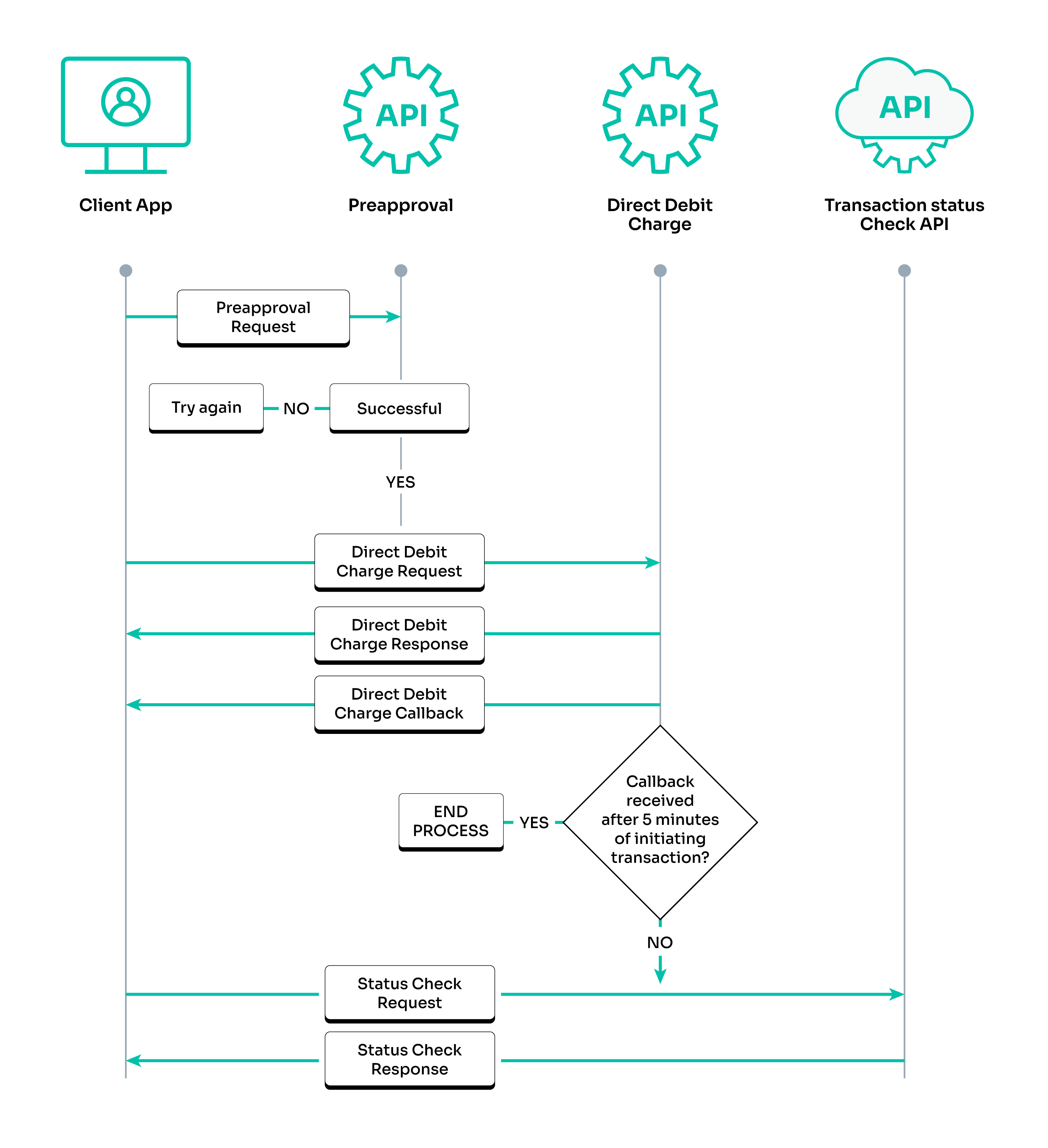
The table below describes the steps involved in using the Direct Debit API:
| Step | Description |
|---|---|
| 1 | Client App makes a Preapproval request to Hubtel. |
| 2 | Hubtel performs authentication on the request and sends a response to Client App accordingly. |
| 3 | Once preapproval process is successful, Client App makes a Direct Debit Charge request to Hubtel. |
| 4 | A final callback is sent to Client App via the callbackUrl provided in the request. (See sample callback here) |
| 5 | In instances where a merchant does not receive the final status of the transaction after five (5) minutes from Hubtel, it is mandatory to perform a status check using the Status Check API to determine the final status of the transaction. (Refer here) |
API Reference
Direct Debit Preapproval Process allows you to gain customer authorization by the customer’s involvement through an OTP code and a PIN confirmation. The preapproval process has three sub-processes which ensure completion of a preapproval.
Note
The preapproval process must be completed once for every mobile wallet you want to directly debit.
Initiate Process
To initiate a Direct Debit transaction, send an HTTP POST request to the below URL with the required parameters. It is also mandatory to pass your Collection Account Number for Direct Debit requests in the endpoint. Find your Collection Account Number here.
https://preapproval.hubtel.com/api/v2/merchant/{Collection_Account_Number}/preapproval/initiateREQUEST PARAMETERS
| Parameter | Type | Requirement | Description |
|---|---|---|---|
| clientReferenceId | String | Mandatory | The reference provided by the API user and must be unique for every transaction and preferably be alphanumeric characters. Maximum length is 36 characters. |
| CustomerMsisdn | String | Mandatory | The customer’s mobile money number. This should be in the international format without plus(+). E.g.: "233249111411" |
| channel | String | Mandatory | The mobile money channel provider. Available channels are: mtn-gh-direct-debit, vodafone-gh-direct-debit |
| callbackUrl | String | Mandatory | The URL expected to receive callback on the final status of a payment from Hubtel. |
Note
Kindly note that a clientReference must never be duplicated for any transaction.
SAMPLE REQUEST
POST /api/v2/merchant/11684/preapproval/initiate HTTP/1.1
Host: preapproval.hubtel.com
Accept: application/json
Content-Type: application/json
Authorization: Basic endjeOBiZHhza250fT3==
Cache-Control: no-cache
{
    "clientReferenceId": "3jL2KlUy3vt21debitC",
    "customerMsisdn": "233200000000",
    "channel": "vodafone-gh-direct-debit",
    "callbackUrl": "https://webhook.site/b503d1a9-e726-f315254a6ede"
}
RESPONSE PARAMETERS
| Parameter | Type | Description |
|---|---|---|
| message | String | The description of response received from the Direct Debit API that is related to the ResponseCode. |
| responseCode | String | The unique response code on the status of the transaction. |
| data | Object | An object containing the required data response from the API. |
| hubtelPreApprovalId | String | The verification preapproval ID which is received in the initiate process response. |
| clientReferenceId | String | The reference provided by the API user and must be unique and preferably be alphanumeric characters. Maximum length is 36 characters. |
| verificationType | String | The verification type; can be USSD or OTP. |
| otpPrefix | String | First part of OTP sent to customer; null when verificationType is USSD. |
| preapprovalStatus | String | Status of the preapproval eg: APPROVED, REJECTED, PENDING (will eventually have final status). |
SAMPLE INITIATE PROCESS RESPONSE (USSD)
{
    "message": "Request received! Pending preapproval",
    "responseCode": "2000",
    "data": {
        "hubtelPreApprovalId": "5f20092321d54eefb974dbfea6de5c34",
        "clientReferenceId": "3jL2KlUy3vt21debitC",
        "verificationType": "USSD",
        "otpPrefix": null,
        "preapprovalStatus": "PENDING"
    }
}
SAMPLE INITIATE PROCESS RESPONSE (OTP)
{
    "message": "Request received! Pending preapproval",
    "responseCode": "2000",
    "data": {
        "hubtelPreApprovalId": "5f20092321d54eefb974dbfea6de5c34",
        "clientReferenceId": "3jL2KlUy3vt21debitC",
        "verificationType": "OTP",
        "otpPrefix": "HNRM",
        "preapprovalStatus": "PENDING"
    }
}
Verify Process
The next process is to verify or authorize a preapproval request after initiate process request is made. This comes in two forms USSD or OTP which is not selectable.
USSD
This verificationType is for a number which is new. For verifying Preapproval, the number receives a USSD prompt which the number must approve to confirm authorization. OTP verification is to be skipped.
Note
For MTN numbers, all pending requests are accessible in the preapprovals list on *170#. Your customers can use this feature in case they do not get a prompt after a preapproval request. Steps;
- Dial *170#
- Navigate to 6. My Wallet
- Choose 3. My Approvals
- Select 2. PreApprovals
- Approve
OTP
This verificationType is for a number which has already been preapproved by another Merchant. In this case, the number gets an OTP with a 4-digit code you’ll need in verifying the customer.
To verify an OTP, send an HTTP POST request to the below URL with the required parameters:
https://preapproval.hubtel.com/api/v2/merchant/{Collection_Account_Number}/preapproval/verifyotpREQUEST PARAMETERS
| Parameter | Type | Requirement | Description |
|---|---|---|---|
| customerMsisdn | String | Mandatory | The customer’s mobile money number. This should be in the international format without plus(+). E.g.: "233249111411" |
| hubtelPreApprovalId | String | Mandatory | The verification preapproval ID which is received in the initiate process response. |
| clientReferenceId | String | Mandatory | The reference provided by the API user and must be unique for every transaction and preferably be alphanumeric characters. Maximum length is 36 characters. |
| otpCode | String | Mandatory | The OTP code used for verification. It consists of the four letter otpPrefix received in the initiate process response and the four digit OTP code sent to the customer. Eg:"RTYE-9231". |
SAMPLE VERIFY OTP REQUEST
POST /api/v2/merchant/11684/preapproval/verifyotp HTTP/1.1
Host: preapproval.hubtel.com
Accept: application/json
Content-Type: application/json
Authorization: Basic endjeOBiZHhza250fT3==
Cache-Control: no-cache

{
  "customerMsisdn": "233200000000",
  "hubtelPreApprovalId": "5f20092321d54eefb974dbfea6de5c34",
  "clientReferenceId": "3jL2KlUy3vt21debitC",
  "otpCode": "HNRM-8852"
}
SAMPLE VERIFY OTP RESPONSE
{
  "message": "OTP Verified! Pending preapproval",
  "responseCode": "2000",
  "data": {
    "hubtelPreApprovalId": "5f20092321d54eefb974dbfea6de5c34",
    "preapprovalStatus": "PENDING"
  }
}
Preapproval Callback
Since the Preapproval Process has an asynchronous flow on all networks, Hubtel mandatory sends callback payload to the callbackURL specified in the Initiate Process for their final status. Hence the callback URL you specified in the Initiate Process request should be implemented to listen for HTTP POST payload from Hubtel.
SAMPLE CALLBACK (Approved)
{
  "CustomerMsisdn": "233200000000",
  "VerificationType": "USSD",
  "PreapprovalStatus": "APPROVED",
  "HubtelPreapprovalId": "5f20092321d54eefb974dbfea6de5c34",
  "ClientReferenceId": "3jL2KlUy3vt21debitC",
  "CreatedAt": "2022-11-14T21:08:16.7533466Z"
}
SAMPLE CALLBACK (Failed)
{
  "CustomerMsisdn": "233200000000",
  "VerificationType": "OTP",
  "PreapprovalStatus": "FAILED",
  "HubtelPreapprovalId": "5f20092321d54eefb974dbfea6de5c34",
  "ClientReferenceId": "3jL2KlUy3vt21debitC",
  "CreatedAt": "2022-11-14T21:08:16.7533466Z"
}
Preapproval Status Check
In rare instances where callback was not received due to timeout or for double confirmation, the Preapproval Status Check can be called. To check a preapproval status, send an HTTP GET request to the below URL with the required parameters in the endpoint. Find your Collection Account Number here.
https://preapproval.hubtel.com/api/v2/merchant/{Collection_Account_Number}/preapproval/{clientReferenceId}/statusSAMPLE PREAPPROVAL STATUS CHECK REQUEST
GET /api/v2/merchant/11684/preapproval/3jL2KlUy3vt21debitC/status HTTP/1.1
Host: preapproval.hubtel.com
Accept: application/json
Content-Type: application/json
Authorization: Basic endjeOBiZHhza250fT3=
Cache-Control: no-cache
RESPONSE PARAMETERS
| Parameter | Type | Description |
|---|---|---|
| message | String | The description of response received from the Direct Debit API that is related to the ResponseCode. |
| responseCode | String | The unique response code on the status of the transaction. |
| data | Object | An object containing the required data response from the Preapproval Process. |
| customerMsisdn | String | The customer’s mobile money number. This should be in the international format without plus(+). E.g.: "233249111411" |
| verificationType | String | The channel used for preapproval/verification. E.g.: USSD, OTP. |
| preapprovalStatus | String | Status of the preapproval eg: APPROVED, FAILED, EXPIRED. |
| hubtelPreApprovalId | String | The verification preapproval ID which is received in the initiate process response. |
| clientReferenceId | String | The reference provided by the API user and must be unique and preferably be alphanumeric characters. Maximum length is 36 characters. |
| createdAt | String | Date and time preapproval was initiated. |
SAMPLE PREAPPROVAL STATUS CHECK RESPONSE
{
  "message": "Success",
  "code": "2000",
  "data": {
    "customerMsisdn": "233546335113",
    "verificationType": "USSD",
    "preapprovalStatus": "APPROVED",
    "hubtelPreapprovalId": "5f20092321d54eefb974dbfea6de5c34",
    "clientReferenceId": "3jL2KlUy3vt21debitC",
    "createdAt": "2023-08-11T18:18:55.6439374Z"
  }
}
Cancel Preapproval
In instances where the need arises to revoke a customer's authorization or preapproval, there is the option to call the Cancel Preapproval. To cancel preapproval, send an HTTP GET request to the below URL with the required parameters in the endpoint. Find your Collection Account Number here.
https://preapproval.hubtel.com/api/v2/merchant/{Collection_Account_Number}/preapproval/{customerMsisdn}/cancelSAMPLE CANCEL PREAPPROVAL REQUEST
GET /api/v2/merchant/11684/preapproval/233200000000/cancel HTTP/1.1
Host: preapproval.hubtel.com
Accept: application/json
Content-Type: application/json
Authorization: Basic endjeOBiZHhza250fT3==
Cache-Control: no-cache
RESPONSE PARAMETERS
| Parameter | Type | Description |
|---|---|---|
| message | String | The description of response received from the Cancel Preapproval API that is related to the response code. |
| responseCode | String | The unique response code on the status of the transaction. |
| data | Object | A Boolean value related to the response code from the Preapproval Process. |
SAMPLE CANCEL PREAPPROVAL RESPONSE
{
  "message": "Successfully cancelled preapproval for customer 233548359582 and business gershon",
  "responseCode": "2000",
  "data": true
}
Reactivate Preapproval
In instances where the need arises to activate preapproval after the customer cancels, the Reactivate Preapproval API can be called. To reactivate preapproval, send an HTTP POST request to the below URL with the required parameters. Find your Collection Account Number here.
https://preapproval.hubtel.com/api/v2/merchant/{Collection_Account_Number}/preapproval/reactivateREQUEST PARAMETERS
| Parameter | Type | Description |
|---|---|---|
| callbackUrl | String | The URL expected to receive callback payload of Preapproval Status. |
| customerMsisdn | String | The customer’s mobile money number. This should be in the international format without plus(+). E.g.: "233249111411" |
SAMPLE REACTIVATE PREAPPROVAL REQUEST
POST /api/v2/merchant/11684/preapproval/reactivate HTTP/1.1
Host: preapproval.hubtel.com
Accept: application/json
Content-Type: application/json
Authorization: Basic endjeOBiZHhza250fT3=
Cache-Control: no-cache

{
  "callbackUrl": "https://webhook.site/b503d1af9-e726-f315254a6ede",
  "customerMsisdn": "233200000000",
}
RESPONSE PARAMETERS
| Parameter | Type | Description |
|---|---|---|
| message | String | The description of response received from the Direct Debit API that is related to the ResponseCode. |
| responseCode | String | The unique response code on the status of the transaction. |
| data | Object | An object containing the required data response from the API. |
| hubtelPreApprovalId | String | The verification preapproval ID which is received in the initiate process response. |
| clientReferenceId | String | The reference provided by the API user and must be unique and preferably be alphanumeric characters. Maximum length is 36 characters. |
| verificationType | String | The verification type; can be USSD or OTP. |
| otpPrefix | String | First part of OTP sent to customer; null when verificationType is USSD. |
| preapprovalStatus | String | Status of the preapproval eg: APPROVED, REJECTED, PENDING (will eventually have final status). |
SAMPLE REACTIVATE PREAPPROVAL RESPONSE
{
    "message": "Request received! Pending preapproval",
    "responseCode": "2000",
    "data": {
        "hubtelPreApprovalId": "5f20092321d54eefb974dbfea6de5c34",
        "clientReferenceId": "3jL2KlUy3vt21debitC",
        "verificationType": "OTP",
        "otpPrefix": "GNCC",
        "preapprovalStatus": "PENDING"
    }
}
Direct Debit Charge
This allows you to directly debit a mobile wallet without any OTP or Mobile Money PIN. This is only successful when the preapproval process is completed by the customer for your Hubtel merchant account. Note that the flow for charging mobile subscribers differs across the various Telco networks.
To initiate a Debit Charge transaction, send an HTTP POST request to the below URL with the required parameters. It is also mandatory to pass your Collection Account Number for Direct Debit requests in the endpoint. Find your Collection Account Number here.
https://rmp.hubtel.com/merchantaccount/merchants/{Collection_Account_Number}receive/mobilemoneyREQUEST PARAMETERS
| Parameter | Type | Requirement | Description |
|---|---|---|---|
| CustomerName | String | Optional | The name on the customer’s mobile money wallet. |
| CustomerMsisdn | String | Mandatory | The customer’s mobile money number. This should be in the international format. E.g.: "233249111411" |
| CustomerEmail | String | Optional | Email of customer. |
| Channel | String | Mandatory | The mobile money channel provider. Available channels are: mtn-gh-direct-debit, vodafone-gh-direct-debit. |
| Amount | Float | Mandatory | Amount of money to be debited during this transaction. NB: Only 2 decimal places is allowed E.g.: 0.50. |
| PrimaryCallbackURL | String | Mandatory | The URL expected to receive callback on the final status of a payment from Hubtel. |
| Description | String | Mandatory | A brief description of the transaction. |
| ClientReference | String | Mandatory | The reference provided by the API user and must be unique for every transaction and preferably be alphanumeric characters. Maximum length is 36 characters. |
Note
Kindly note that a clientReference must never be duplicated for any transaction.
SAMPLE DEBIT CHARGE REQUEST
POST /merchantaccount/merchants/11684/receive/mobilemoney HTTP/1.1
Host: rmp.hubtel.com
Accept: application/json
Content-Type: application/json
Authorization: Basic endjeOBiZHhza250fT3==
Cache-Control: no-cache

{
    "CustomerName": "Joe Doe",
    "CustomerMsisdn": "233200000000",
    "CustomerEmail": "[email protected]",
    "Channel": "vodafone-gh-direct-debit",
    "Amount": 0.8,
    "PrimaryCallbackUrl": "https://webhook.site/b503d1a9-e726-f315254a6ede",
    "Description": "Union Dues",
    "ClientReference": "3jL2KlUy3vt21"
}
RESPONSE PARAMETERS
| Parameter | Type | Description |
|---|---|---|
| Message | String | The description of response received from the API that is related to the ResponseCode. |
| ResponseCode | String | The unique response code on the status of the transaction. |
| Data | Object | An object containing the required data response from the API. |
| TransactionId | String | The unique ID used to identify a Hubtel transaction (from Hubtel). |
| Description | String | The description initially provided by API user in the request payload. |
| ClientReference | String | The reference ID that is initially provided by the client/API user in the request payload (from merchant). |
| Amount | Float | The transaction amount. |
| Charges | Float | The charge/fee for the transaction. |
| AmountAfterCharges | Float | The transaction amount after charges/fees deduction. |
| AmountCharged | Float | The actual amount that is charged from the customer’s mobile money wallet. |
| DeliveryFee | Float | The delivery fee of the transaction is normally zero (0.0). |
SAMPLE RESPONSE
{
  "Message": "Transaction pending. Expect callback request for final state",
  "ResponseCode": "0001",
  "Data": {
    "TransactionId": "09f84e20a283942e807128e8c21d08d6",
    "Description": "Union Dues",
    "ClientReference": "3jL2KlUy3vt21",
    "Amount": 0.8,
    "Charges": 0.05,
    "AmountAfterCharges": 0.8,
    "AmountCharged": 0.85,
    "DeliveryFee": 0.0
  }
}
Direct Debit Charge Callback
The Direct Debit Charge API mandatorily sends a payload to callbackURL provided in each request. The callback payload determines final status of a pending transaction response i.e.; transaction with 0001 ResponseCode. The callback URL you specified in the Direct Debit request should be implemented to listen for an HTTP POST payload from Hubtel.
Debit Charge request has an asynchronous flow on all networks. This means that the final status of a transaction cannot be determined immediately after the request. It may take some time (usually less than 30 seconds). Hence, it is paramount and required to implement a HTTP callback on your server to be able to receive final status of each transaction.
Note
Businesses that want to add an extra layer of security to ensure callbacks reach their endpoint securely can whitelist Hubtel’s callback IP address: 18.202.122.131
SAMPLE CALLBACK (Successful)
{
    "ResponseCode": "0000",
    "Message": "success",
    "Data": {
        "Amount": 0.8,
        "Charges": 0.05,
        "AmountAfterCharges": 0.8,
        "Description": " The Vodafone Cash payment has been approved and processed successfully",
        "ClientReference": "3jL2KlUy3vt21",
        "TransactionId": "09f84e20a283942e807128e8c21d08d6",
        "ExternalTransactionId": "2116938399",
        "AmountCharged": 0.85,
        "OrderId": "09f84e20a283942e807128e8c21d08d6",
        "PaymentDate": "2024-05-14T00:44:57.5142719Z"
    }
}
SAMPLE CALLBACK (Failed)
{
    "ResponseCode": "2001",
    "Message": "failed",
    "Data": {
        "Amount": 0.8,
        "Charges": 0.05,
        "AmountAfterCharges": 0.8,
        "Description": "FAILED",
        "ClientReference": "3jL2KlUy3vt21",
        "TransactionId": "09f84e20a283942e807128e8c21d08d6",
        "ExternalTransactionId": "2116938399",
        "AmountCharged": 0.85,
        "OrderId": "09f84e20a283942e807128e8c21d08d6",
        "PaymentDate": "2024-05-14T00:44:57.5142719Z"
    }
}
Transaction Status Check
It is mandatory to implement the Transaction Status Check API as it allows merchants to check for the status of a transaction in rare instances where a merchant does not receive the final status of the transaction from Hubtel after five (5) minutes.
To check the status of a transaction, send an HTTP GET request to the below URL, with either one or more unique transaction identifiers as parameters.
It is also mandatory to parse your Collection Account Number for Status Check requests in the endpoint. Find your Collection Account Number here.
Note
Only requests from whitelisted IP(s) can reach the endpoint. Requests from IP addresses that have not been whitelisted will return a 403 Forbidden error response or a timeout. Submit your public IP(s) to your Retail Systems Engineer to be whitelisted.
We permit a maximum of 4 IP addresses per service.
https://api-txnstatus.hubtel.com/transactions/{Collection_Account_Number}/statusREQUEST PARAMETERS
| Parameter | Type | Requirement | Description |
|---|---|---|---|
| clientReference | String | Mandatory (preferred) | The client reference of the transaction specified in the request payload. |
| hubtelTransactionId | String | Optional | Transaction ID from Hubtel after successful payment. |
| networkTransactionId | String | Optional | The transaction reference from the mobile money provider. |
Note
Although either one of the unique transaction identifiers above could be passed as parameters, clientReference is recommended to be used often.
SAMPLE REQUEST
GET /transactions/11684/status?clientReference=3jL2KlUy3vt21 HTTP/1.1
Host: api-txnstatus.hubtel.com
Authorization: Basic QmdfaWghe22NU6bXVhaHdpYW8pfQ==
RESPONSE PARAMETERS
| Parameter | Type | Description |
|---|---|---|
| message | String | The description of response received from the API that is related to the ResponseCode. |
| responseCode | String | The response code of the API after the request. |
| data | Object | An object containing the required data response from the API. |
| date | String | Date of the transaction. |
| status | String | Status of the transaction i.e.: Paid, Unpaid or Refunded. |
| transactionId | String | The unique ID used to identify a Hubtel transaction (from Hubtel). |
| externalTransactionId | String | The transaction reference from the mobile money provider (from Telco). |
| paymentMethod | String | The mode of payment. |
| clientReference | String | The reference ID that is initially provided by the client/API user in the request payload (from merchant). |
| currencycode | String | Currency of the transaction; could be null. |
| amount | Float | The transaction amount. |
| charges | Float | The charge/fee for the transaction. |
| amountAfterCharges | Float | The transaction amount after charges/fees deduction. |
| isFulfilled | Boolean | Whether service was fulfilled; could be null. |
SAMPLE RESPONSE (Paid)
{
  "message": "Successful",
  "responseCode": "0000",
  "data": {
      "date": "2024-04-25T21:45:48.4740964Z",
      "status": "Paid",
      "transactionId": "7fd01221faeb41469daec7b3561bddc5",
      "externalTransactionId": "0000006824852622",
      "paymentMethod": "mobilemoney",
      "clientReference": "3jL2KlUy3vt21",
      "currencyCode": null,
      "amount": 0.1,
      "charges": 0.02,
      "amountAfterCharges": 0.08,
      "isFulfilled": null
  }
}
SAMPLE RESPONSE (Unpaid)
{
  "message": "Successful",
  "responseCode": "0000",
  "data": {
      "date": "2024-04-25T21:45:48.4740964Z",
      "status": "Unpaid",
      "transactionId": "7fd01221faeb41469daec7b3561bddc5",
      "externalTransactionId": "0000006824852622",
      "paymentMethod": "mobilemoney",
      "clientReference": "3jL2KlUy3vt21",
      "currencyCode": null,
      "amount": 0.1,
      "charges": 0.02,
      "amountAfterCharges": 0.08,
      "isFulfilled": null
  }
}
Response Codes
The Hubtel Sales API uses standard HTTP error reporting. Successful requests return HTTP status codes in the 2xx. Failed requests return status codes in 4xx and 5xx. Response codes are included in the JSON response body, which contain information about the response.
| Response Code | Description | Required Action |
|---|---|---|
| 0000 | The transaction has been processed successfully. | None |
| 0001 | Request has been accepted. A callback will be sent on final state | None |
| 2000 | • success • Request received! Pending preapproval • OTP Verified! Pending preapproval • success, Customer is already preapproved | None |
| 2001 | • The MTN Mobile Money user has reached counter or balance limits, has insufficient funds or is missing permissions. • The Vodafone Cash failed • Dear Customer, you have insufficient funds. Avail. Balance:#### 5 successive invalid transfers will lock your account. Thank you. • Transaction id is invalid | • Mobile network not able to parse your request • USSD session timeout • Having strange characters (&*!%@) in your description • Ensure that the number provided matches the channel |
| 4000 | Validation errors | Validation errors. Something is not quite right with this request. Please check again. |
| 4070 | We're unable to complete this payment at the moment. Please try again later. Fees not set for given conditions. | Ensure you are passing the required minimum amount or contact your Hubtel relationship manager to setup fees for your account if error persists. |
| 4101 | • The business you're trying to pay isn't fully set up to receive payments at the moment. Please try again later • Supplied API keys does not have "mobilemoney-receive-direct" in scopes. • Client request keys do not match API keys on business | • Contact your Retail Systems Engineer to enable Receive Money Scopes • Ensure that you're providing the correct Basic Auth key for the Authorization header and ensure you’re passing your Collection Account Number in the endpoint. |
| 4103 | • Permission denied. • Sorry, your account is not allowed to transact on this channel | Contact your Retail Systems Engineer |
| 4204 | Preapproval request failed! Please try again. | Inspect your request and try again |