
Recurring Invoice
Set up recurring mobile money and card payments.
Overview
The Hubtel Recurring Invoice API allows you to setup and receive recurring payments from your customers for services provided using mobile money.
With a single integration, you can accept recurring mobile money payments on your application. All you need is to provide the customer debit details and Hubtel will handle the scheduling and the various debit deductions.
The following provides an overview of the REST API endpoints for interacting programmatically with the Hubtel Recurring Invoice API within your application.
Available Channels
The following are the available channels through which you can setup and receive recurring payments from your customers.
| Mobile Money Provider | Channel Name |
|---|---|
| MTN Ghana | mtn_gh_rec |
| Telecel Ghana | vodafone_gh_rec |
Getting Started
Business IP Whitelisting
You must share your public IP address with your Retail System Engineer for whitelisting.
Note
All API Endpoints are live and only requests from whitelisted IP(s) can reach these endpoints shared in this reference.
Requests from IP addresses that have not been whitelisted will return a 403 Forbidden error response or a timeout.
We permit a maximum of 4 IP addresses per service.
Understanding the Service Flow
The Hubtel Recurring Invoice service includes two main API endpoints which are used together to setup a recurring payment invoice. They are:
- Create Invoice Endpoint: This allows you to create a recurring payment invoice on a customer wallet. The invoice will stay in a temporary state until the verification is done. This step initiates the invoice creation process.
- Verify Invoice Endpoint: This allows you to verify the invoice with the customer involvement through an OTP code. This completes the invoice creation process.
The entire process is asynchronous. The figure below shows the process of creating and verifying a Recurring Payment Invoice using these two endpoints:
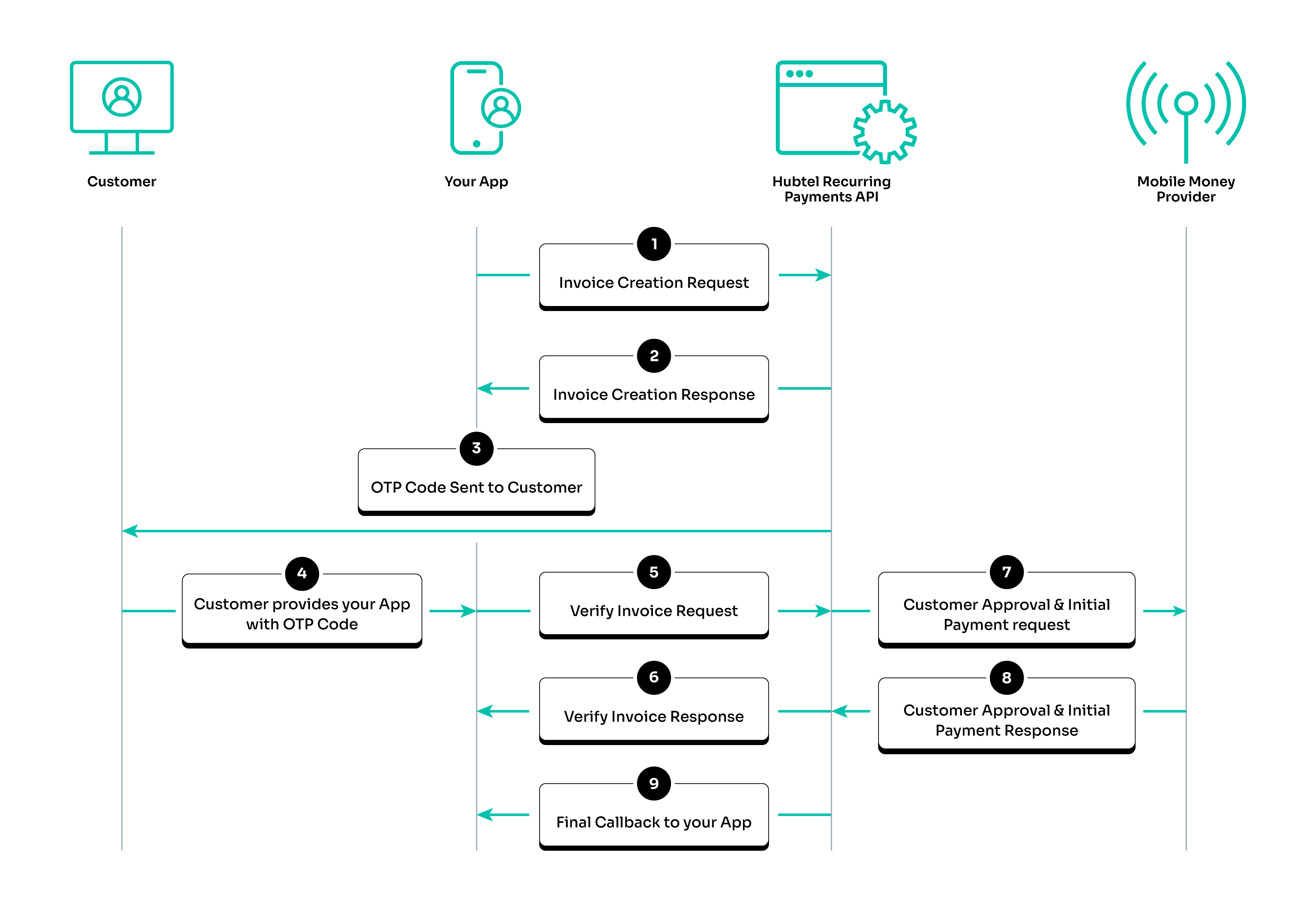
The table below describes the process for creating and verifying a Recurring Payment Invoice:
| Step | Description |
|---|---|
| 1 | Your App sends an Invoice Creation request to Hubtel. |
| 2 | Hubtel performs authentication on request and sends response to your App with a unique identifier (RecurringInvoiceId) |
| 3 | Hubtel sends verification OTP code to customer number to provide to third party (your app). |
| 4 | Your App sends an Invoice Verification request to Hubtel with the customer OTP code and unique identifier (RecurringInvoiceId) |
| 5 | Hubtel performs authentication by initiating a prompt for the customer to approve and sends a response to Your App. |
| 6 | Hubtel goes to Mobile Money provider (with customer confirmation) to perform the initial debit on the customer's wallet. |
| 7 | After the first payment is taken, a callback is sent to your App based on the provided URL. |
| 8 | Whenever the invoice is due (scheduled time), a direct debit is made on the customer's mobile money wallet and a callback is sent to your App. |
Note
For MTN numbers, all pending requests are accessible in the preapprovals list on *170#. Your customers can use this feature in case they do not get a prompt after a preapproval request. Steps;
- Dial *170#
- Navigate to 6. My Wallet
- Choose 3. My Approvals
- Select 2. PreApprovals
- Approve
API Reference
Create Invoice API
To initiate a Create Invoice request, send an HTTP POST request to the below URL with the required parameters. It’s also mandatory to pass your Collection Account Number for Create Invoice requests in the endpoint. Find your Collection Account Number here.
https://rip.hubtel.com/api/proxy/{Collection_Account_Number}/create-invoiceREQUEST PARAMETERS
| Parameter | Type | Requirement | Description |
|---|---|---|---|
| orderDate | String | Mandatory | The date the recurring invoice is created. It is a timestamp preferably in ISO 8601 format YYYYMM-DDThh:mm:ss Eg: “2022-01-28T08:57:00” |
| invoiceEndDate | String | Mandatory | The date the recurring invoice is supposed to end. It is a timestamp preferably in ISO 8601 format YYYY-MM-DDThh:mm:ss Eg: “2022-01-31T08:57:00” |
| Description | String | Mandatory | A brief description of the transaction. You can specify the use of the transaction in this. Eg: “My recurring service” |
| startTime | String | Mandatory | The time of day when the debit would be taken whenever it is due. Format is hh:mm Eg:”10:00” |
| paymentInterval | String | Mandatory | The interval between payments for the customer. The possible options are: • “DAILY” – This means the customer will be debited every day. • “WEEKLY” – This means the customer will be debited every week (7 days). • “MONTHLY” – This means the customer will be debited on the first day of every month. • “QUARTERLY” – This means the customer will be debited every Quarter (3 months). • “YEARLY” – This means the customer will be debited every Year (12 months). |
| customerMobileNumber | String | Mandatory | The customer’s mobile money number. This should be in the international format. Eg: “233249111411” |
| paymentOption | String | Mandatory | The payment option which the customer selects to pay for. Currently, the available options are: “MobileMoney”. |
| Channel | String | Mandatory | The mobile money channel provider. Currently the available channels are: • “mtn_gh_rec” – This is for payments using an MTN mobile money wallet. • “vodafone_gh_rec” – This is for payments using a Vodafone mobile money wallet. • “hubtel_gh” – This is for payments using a hubtel wallet. |
| customerName | String | Optional | The name of the customer. |
| recurringAmount | Float | Mandatory | The amount of money which will be debited from the customer wallet whenever the invoice is due. |
| totalAmount | Float | Mandatory | The total amount to be debited from the customer wallet. Currently pass the same value as the recurringAmount. |
| initialAmount | Float | Mandatory | The amount to be debited from the customer wallet for the first payment. This can be different from the recurringAmount. |
| Currency | String | Mandatory | The currency of the transaction. |
| callbackUrl | String | Mandatory | A URL used to receive the callback for successful invoice creation and debit. All subsequent debit callbacks are also sent to this same URL. |
RESPONSE PARAMETERS
| Parameter | Type | Description |
|---|---|---|
| ResponseCode | String | The unique response code on the status of the transaction. |
| Message | String | The message accompanying the response code. This gives a brief description of the response from the API. |
| Data | Object | An object containing the required data response from the API. |
| recurringInvoiceId | String | The unique ID used to identify a recurring invoice. This ID will be used anytime a debit is done on the customer wallet for this invoice. |
| requestId | String | The verification request ID which is to be used in the Verify Invoice request payload. |
| verificationType | String | The verification type; can be USSD or OTP. |
| otpPrefix | String | A 4 letter word prefix which is to be used together with the actual OTP code send to the customer in the Verify Invoice request payload. |
SAMPLE CREATE INVOICE REQUEST FOR MTN
POST /api/proxy/11684/create-invoice HTTP/1.1
Host: rip.hubtel.com
Accept: application/json
Content-Type: application/json
Authorization: Basic endjeOBiZHhza250fT3==
Cache-Control: no-cache

{
  "orderDate": "2022-01-28T08:57:00",
  "invoiceEndDate": "2022-01-31T08:57:00",
  "description": "My recurring service",
  "startTime": "14:00",
  "paymentInterval": "DAILY",
  "customerMobileNumber": "233240000000",
  "paymentOption": "MobileMoney",
  "channel": "mtn_gh_rec",
  "customerName": "Joe Doe",
  "recurringAmount": 0.10,
  "totalAmount": 0.10,
  "initialAmount": 0.10,
  "currency": "GHS",
  "callbackUrl": "https://webhook.site/b503d1a9-e726-f315254a6ede"
}
SAMPLE CREATE INVOICE REQUEST FOR TELECEL
POST /api/proxy/11684/create-invoice HTTP/1.1
Host: rip.hubtel.com
Accept: application/json
Content-Type: application/json
Authorization: Basic endjeOBiZHhza250fT3==
Cache-Control: no-cache

{
  "orderDate": "2022-01-28T08:57:00",
  "invoiceEndDate": "2022-01-31T08:57:00",
  "description": "My recurring service",
  "startTime": "14:00",
  "paymentInterval": "DAILY",
  "customerMobileNumber": "233200010000",
  "paymentOption": "MobileMoney",
  "channel": "vodafone_gh_rec",
  "customerName": "Joe Doe",
  "recurringAmount": 0.10,
  "totalAmount": 0.10,
  "initialAmount": 0.10,
  "currency": "GHS",
  "callbackUrl": "https://webhook.site/b503d1a9-e726-f315254a6ede"
}
SAMPLE RESPONSE
{
  "responseCode": "0001",
  "message": "Your request has been processed successfully.",
  "data": {
    "recurringInvoiceId": "0f84e20a2839482e807128e8c21d08d6",
    "requestId": "a6487bc44eae44849fd80326a0dd802a",
    "otpPrefix": "OQDM"
  }
}
Verify Invoice API
To send a Verify Invoice request, send an HTTP POST request to the below URL with the required parameters:
https://rip.hubtel.com/api/proxy/verify-invoiceREQUEST PARAMETERS
| Parameter | Type | Requirement | Description |
|---|---|---|---|
| recurringInvoiceId | String | Mandatory | The unique ID used to identify the recurring invoice being verified. It is taken from the create invoice response. |
| requestId | String | Mandatory | The verification request ID which is received in the create invoice response. |
| otpCode | String | Mandatory | The OTP code used for verification. It consists of the four letter otpPrefix received in the create invoice response and the four digit OTP code sent to the customer. Eg: ”RTYE-9231” |
RESPONSE PARAMETERS
| Parameter | Type | Description |
|---|---|---|
| responseCode | String | The unique response code on the status of the transaction. |
| message | String | The message accompanying the response code. This gives a brief description of the response from the API. |
| data | Object | An object containing the required data response from the API. |
| recurringInvoiceId | String | The unique ID used to identify a recurring invoice. This ID will be used anytime a debit is done on the customer wallet for this invoice. |
SAMPLE VERIFY INVOICE REQUEST
POST /api/proxy/verify-invoice HTTP/1.1
Host: rip.hubtel.com
Accept: application/json
Content-Type: application/json
Authorization: Basic endjeOBiZHhza250fT3==
Cache-Control: no-cache
{
  "recurringInvoiceId": "0f84e20a2839482e807128e8c21d08d6",
  "requestId": "a6487bc44eae44849fd80326a0dd802a",
  "otpCode": "OQDM-9514"
}
SAMPLE RESPONSE
{
  "responseCode": "0001",
  "message": "Your request has been processed successfully. You will receive a callback on the final status shortly.",
  "data": {
    "recurringInvoiceId": "0f84e20a2839482e807128e8c21d08d6"
  }
}
Callback
When you provide a callback URL in your invoice creation request, you will be sent a callback on the final state of the invoice as well as the final state of all payments made on that invoice. This means the callback URL you specify should be implemented to listen for an HTTP POST payload from Hubtel.
Recurring invoice creation requires a one-time approval from the customer in order for money to move from the mobile money wallet into your Hubtel Account. As a result, invoice creation has an asynchronous flow on all networks. This also means that the final status of an invoice cannot be determined immediately after the request. It may take some time (usually less than 10 minutes). So you're required to implement an HTTP callback on your server to be able to receive final status of the transaction.
Note
Businesses that want to add an extra layer of security to ensure callbacks reach their endpoint securely can whitelist Hubtel’s callback IP address: 34.241.57.109
SAMPLE CALLBACK (Successful)
{
  "ResponseCode": "0000",
  "Message": "Success",
  "Data": {
    "OrderId": "1d0e06bc689c4de2bb87a54829a89640",
    "Description": "My recurring service",
    "RecurringInvoiceId": "8ae267e31af748d4934b0420be6f47f0",
    "TransactionId": "5814152092296267804084",
    "ClientReference": "8ae267e31af748d4934b0420be6f47f0",
    "ExternalTransactionId": "5814152092296267804084",
    "OrderDate": "2020-02-10 09:58:00",
    "InvoiceEndDate": "2021-10-14 12:00:00",
    "CustomerMobileNumber": "233246912184",
    "Charges": 0.01,
    "AmountAfterCharges": 0.19,
    "AmountCharged": 0.20,
    "Amount": 0.20,
    "InitialAmount": 0.20,
    "RecurringAmount": 0.10
  }
}
SAMPLE CALLBACK (Failed)
{
  "ResponseCode": "2001",
  "Message": "Failed",
  "Data": {
    "OrderId": "1d0e06bc689c4de2bb87a54829a89640",
    "Description": "My recurring service",
    "RecurringInvoiceId": "8ae267e31af748d4934b0420be6f47f0",
    "TransactionId": "5814152092296267804084",
    "ClientReference": "8ae267e31af748d4934b0420be6f47f0",
    "ExternalTransactionId": null,
    "OrderDate": "2020-02-10 09:58:00",
    "InvoiceEndDate": "2021-10-14 12:00:00",
    "CustomerMobileNumber": "233246912184",
    "Charges": 0.01,
    "AmountAfterCharges": 0.19,
    "AmountCharged": 0.20,
    "Amount": 0.20,
    "InitialAmount": 0.20,
    "RecurringAmount": 0.10
  }
}
Cancel Invoice API
To send a Cancel Invoice request, send an HTTP DELETE request to the below URL with the required parameters: It’s also mandatory to pass your Collection Account Number for Cancel Invoice requests in the endpoint. Find your Collection Account Number here.
https://rip.hubtel.com/api/proxy/{Collection_Account_Number}/cancel-invoice/{recurringInvoiceId}REQUEST PARAMETERS
| Parameter | Type | Requirement | Description |
|---|---|---|---|
| recurringInvoiceId | String | Mandatory | The unique ID used to identify the recurring invoice being verified. It is taken from the create invoice response. |
RESPONSE PARAMETERS
| Parameter | Type | Description |
|---|---|---|
| ResponseCode | String | The unique response code on the status of the transaction. |
| Message | String | The message accompanying the response code. This gives a brief description of the response from the API. |
SAMPLE CANCEL INVOICE HTTP REQUEST
DELETE /api/proxy/11684/cancel-invoice/0f84e20a2839482e807128e8c21d08d6 HTTP/1.1
Host: rip.hubtel.com
Accept: application/json
Content-Type: application/json
Authorization: Basic endjeOBiZHhza250f3==
Cache-Control: no-cache
SAMPLE CANCEL INVOICE RESPONSE
{
  "responseCode": "0000",
  "message": "Your request has been processed successfully"
}
SAMPLE CALLBACK FOR CANCEL INVOICE
{
  "ResponseCode": "0005",
  "Message": "The Repeat Payment Invoice has been Deactivated Successfully",
  "Data": {
    "OrderId": null,
    "Description": "My recurring service",
    "RecurringInvoiceId": "8ae267e31af748d4934b0420be6f47f0",
    "TransactionId": "",
    "ClientReference": "",
    "ExternalTransactionId": "",
    "OrderDate": "2020-02-10 09:58:00",
    "InvoiceEndDate": "2021-10-14 12:00:00",
    "CustomerMobileNumber": "233246912184",
    "Charges": 0.01,
    "AmountAfterCharges": 0.19,
    "AmountCharged": 0.20,
    "Amount": 0.20,
    "InitialAmount": 0.20,
    "RecurringAmount": 0.10
  }
}
Response Codes
The Hubtel Sales API uses standard HTTP error reporting. Successful requests return HTTP status codes in the 2xx. Failed requests return status codes in 4xx and 5xx. Response codes are included in the JSON response body, which contain information about the response.
| Response Code | Description |
|---|---|
| 0000 | The transaction was successful. (final status) |
| 0001 | Pending State. The transaction has been processed successfully. A callback will be sent on the final state. |
| 0005 | There was an HTTP failure/exception when reaching the payment partner or Successful Invoice Cancellation. |
| 2001 | The transaction failed. Either because the approval failed with the network provider or because the initial payment failed. |
| 4000 | Validation Errors. Something is not quite right with this request. Please check and try again. |
| 4101 | Authorization for request is denied. |
| 4103 | Permission denied |