
Direct Send-To-Bank
Transfer money to banks on the GhIPSS network.
Overview
The Hubtel Sales API allows you to sell goods and services online, instore and on mobile. With a single integration, you can:
- Accept mobile money payments on your application, sell services in-store, online and on mobile as well as process all your sales on your Hubtel account.
- Send money to your customers.
This API can be used to provide a wide array of services including: processing e-commerce payments, mobile banking, bulk payments and more. You can also accept payments for goods and services into your account.
The following provides an overview of the Send-To-Bank API endpoints for interacting programmatically within your application.
Available Channels
The following are the available Bank channels through which a merchant can send money from a Hubtel Account to a Bank Account Number.
| Bank Channel | BankCode |
|---|---|
| STANDARD CHARTERED BANK | 300302 |
| ABSA BANK GHANA LIMITED | 300303 |
| GCB BANK LIMITED | 300304 |
| NATIONAL INVESTMENT BANK | 300305 |
| ARB APEX BANK LIMITED | 300306 |
| AGRICULTURAL DEVELOPMENT BANK | 300307 |
| UNIVERSAL MERCHANT BANK | 300309 |
| REPUBLIC BANK LIMITED | 300310 |
| ZENITH BANK GHANA LTD | 300311 |
| ECOBANK GHANA LTD | 300312 |
| CAL BANK LIMITED | 300313 |
| FIRST ATLANTIC BANK | 300316 |
| PRUDENTIAL BANK LTD | 300317 |
| STANBIC BANK | 300318 |
| FIRST BANK OF NIGERIA | 300319 |
| BANK OF AFRICA | 300320 |
| GUARANTY TRUST BANK | 300322 |
| FIDELITY BANK LIMITED | 300323 |
| SAHEL - SAHARA BANK (BSIC) | 300324 |
| UNITED BANK OF AFRICA | 300325 |
| ACCESS BANK LTD | 300329 |
| CONSOLIDATED BANK GHANA | 300331 |
| FIRST NATIONAL BANK | 300334 |
| GHL BANK | 300362 |
Getting Started
Business IP Whitelisting
You must share your public IP address with your Retail System Engineer for whitelisting.
Note
All API Endpoints are live and only requests from whitelisted IP(s) can reach these endpoints shared in this reference.
Requests from IP addresses that have not been whitelisted will return a 403 Forbidden error response or a timeout.
We permit a maximum of 4 IP addresses per service.
Understanding the Service Flow
The Hubtel Sales API allows you to integrate multiple functionalities into your applications. This document focuses on:
- Direct Send-To-Bank API: EST API to send money to a bank account number of any available bank channels.
- Transaction Status Check API: REST API to check for the status of a Send-To-Bank transaction initiated previously after after five (5) or more minutes of the transaction’s completion. It is mandatory to implement the Transaction Status Check API only for transactions that you do not receive a callback from Hubtel.
The entire process is asynchronous. The figure below demonstrates the service flow using these two endpoints:
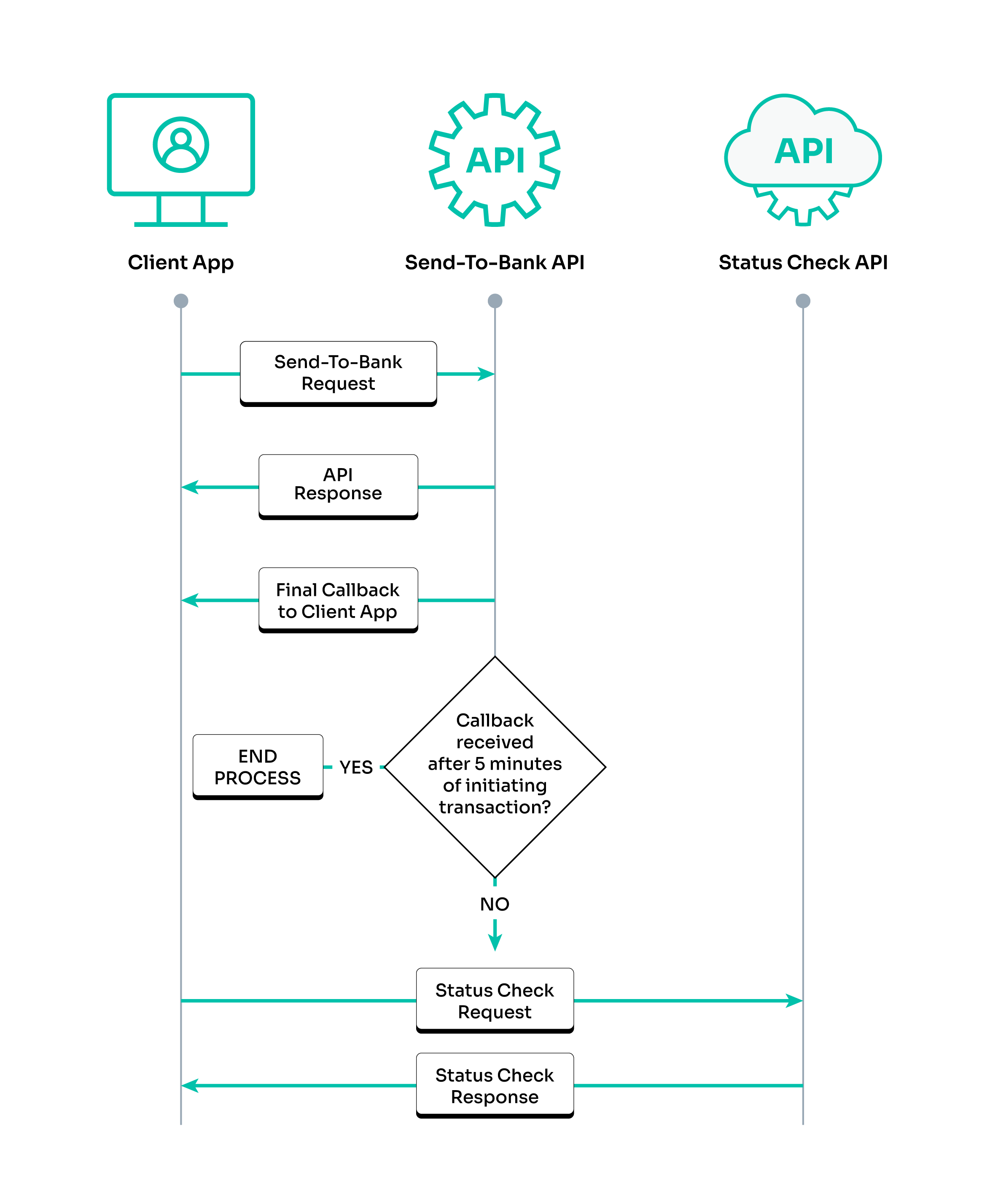
The table below describes the steps involved in Sending Money using the API:
| Step | Description |
|---|---|
| 1 | Client App makes a Send-To-Bank request to Hubtel. |
| 2 | Hubtel performs authentication on the request and sends a response to Client App accordingly. |
| 3 | A final callback is sent to Client App via the PrimaryCallbackURL provided in the request. (See sample callback here) |
| 4 | In instances where a merchant does not receive the final status of the transaction after five (5) minutes from Hubtel, it is mandatory to perform a status check using the Status Check API to determine the final status of the transaction. (Refer here) |
API Reference
Direct Send-To-Bank allows you to send money to all available banks on the GhIPSS network. See list of available banks here.
You need to have enough balance in your Disbursement Account to use this functionality. You can fund your Disbursement Account online here or by transferring money from your Hubtel Collection Account. Kindly contact your Relationship Manager for more info.
To initiate a Send-To-Bank transaction, send an HTTP POST request to the below URL with the required parameters. It is also mandatory to pass your Disbursement Account Number and BankCode for the actually bank.
https://smp.hubtel.com/api/merchants/{Disbursement_Account_Number}/send/bank/gh/{BankCode}Note
Before proceeding, do the following;
REQUEST PARAMETERS
| Parameter | Type | Requirement | Description |
|---|---|---|---|
| Amount | Float | Mandatory | Amount of money to be sent during this transaction. NB: Only 2 decimal places is allowed E.g.: 0.50. |
| PrimaryCallbackURL | String | Mandatory | URL expected to receive callback payload of Send-to-Bank transactions from Hubtel. Callbacks are sent for transactions with 0001 response code. |
| Description | String | Mandatory | A brief description of the transaction. |
| BankAccountNumber | String | Mandatory | The recipient’s bank account number. |
| BankAccountName | String | Optional | The name linked to the provided bank account. |
| RecipientPhoneNumber | String | Optional | The recipient’s mobile money number. Eg: ”233249111411” |
| BankName | String | Optional | The name of recipient’s bank. Refer here. |
| BankBranch | String | Optional | The recipient’s bank branch. |
| BankBranchCode | String | Optional | Branch Code of recipient’s bank. String can be empty. |
| ClientReference | String | Mandatory | The reference provided by the API user and must be unique for every transaction and preferably be alphanumeric characters. Maximum length is 36 characters. |
Note
ClientReference must never be duplicated for any transaction and Optional Parameters can be empty.
SAMPLE REQUEST
POST /api/merchants/11691/send/bank/gh/300311 HTTP/1.1
Host: smp.hubtel.com
Accept: application/json
Content-Type: application/json
Authorization: Basic endjeOBiZHhza250fT3==
Cache-Control: no-cache

{
    "Amount": 10.0,
    "BankName": "",
    "BankBranch": "",
    "BankBranchCode": "",
    "BankAccountNumber": "4XXXXXXXXX",
    "BankAccountName": "",
    "ClientReference": "sendToBank101",
    "PrimaryCallbackUrl": "https://webhook.site/b503d1a9-e726-f315254a6ede",
    "Description": "Test Deposit",
    "RecipientPhoneNumber": ""
}
RESPONSE PARAMETERS
| Parameter | Type | Description |
|---|---|---|
| ResponseCode | String | The unique response code on the status of the transaction. |
| Data | Object | An object containing the required data response from the Send-To-Bank API. |
| AmountDebited | Float | The actual amount that is charged from your Disbursement Account before transaction is completed. |
| Charges | Float | The charge/fee for the transaction. |
| Amount | Float | Amount to be sent during the transaction. |
| Description | String | The description of the ResponseCode received from the request. |
| ClientReference | String | The reference ID that is initially provided by the client/API user in the request payload (from merchant). |
| TransactionId | String | The unique ID used to identify a Hubtel transaction (from Hubtel). |
| ExternalTransactionId | String | The transaction reference from the upstream provider. |
| Meta | Object | Some metadata about transaction. Could be null. |
| RecipientName | String | The name of the recipient of the transaction before the transaction is complete. Could be null. |
SAMPLE RESPONSE
{
  "ResponseCode": "0001",
  "Data": {
      "AmountDebited": 0.0,
      "TransactionId": "367121386447",
      "Description": "Your request has been accepted. We will notify you when the transaction is completed.",
      "ClientReference": "sendToBank101",
      "ExternalTransactionId": "",
      "Amount": 10.0,
      "Charges": 0.0,
      "Meta": null,
      "RecipientName": null
  }
}
Send-To-Bank Callback
The Hubtel Send-To-Bank API mandatorily sends a payload to the callbackURL provided in each request. The callback payload determines final status of a pending transaction response i.e.; transaction with 0001 ResponseCode. The callback URL you specified in the Send-To-Bank request should be implemented to listen for an HTTP POST payload from Hubtel.
Sending money to a bank account number has an asynchronous flow on all available banks. This means that the final status of a transaction cannot be determined immediately after a request. Hence, it is paramount and required to implement an HTTP callback on your server to be able to receive the final status of each transaction.
Note
Businesses that want to add an extra layer of security to ensure callbacks reach their endpoint securely can whitelist Hubtel’s callback IP address: 18.202.122.131
SAMPLE CALLBACK (Successful)
{
  "ResponseCode": "0000",
  "Data": {
      "AmountDebited": 10.1,
      "TransactionId": "367121386447",
      "ExternalTransactionId": "367121386447",
      "Description": " The Instant Bank Request has been processed successfully",
      "ClientReference": "sendToBank101",
      "Amount": 10.0,
      "Charges": 0.10,
      "Meta": null,
      "RecipientName": "Joe Doe"
  }
}
SAMPLE CALLBACK (Failed)
{
  "ResponseCode": "4075",
  "Data": {
    "AmountDebited": 10.1,
    "TransactionId": "9933e637066a406dba1a8b255b928b44",
    "ClientReference": "sendToBank102",
    "Description": "Insufficient prepaid balance.",
    "ExternalTransactionId": null,
    "Amount": 10,
    "Charges": 0.1,
    "Meta": null,
    "RecipientName": null
  }
}
Send-To-Bank Transaction Status Check API
It is mandatory to implement the Send-To-Bank Transaction Status Check API as it allows merchants to check for the status of a send money transaction in rare instances where a merchant does not receive the final status of the transaction after five (5) minutes from Hubtel.
To check a send money transaction status, send an HTTP GET request to the below URL with either one or more unique transaction identifiers as parameters.
It is also mandatory to parse your Disbursement Account Number for Status Check requests in the endpoint. Find your Disbursement Account Number here.
Note
Only requests from whitelisted IP(s) can reach the endpoint. Requests from IP addresses that have not been whitelisted will return a 403 Forbidden error response or a timeout. Submit your public IP(s) to your Retail Systems Engineer to be whitelisted.
We permit a maximum of 4 IP addresses per service.
https://smrsc.hubtel.com/api/merchants/{Disbursement_Account_Number}/transactions/statusREQUEST PARAMETERS
| Parameter | Type | Requirement | Description |
|---|---|---|---|
| clientReference | String | Mandatory (preferred) | The clientReference of the transaction specified in the request payload. |
| hubtelTransactionId | String | Optional | TransactionId from Hubtel after successful send money request. |
| networkTransactionId | String | Optional | The transaction reference from the mobile money provider. |
Note
Although either one of the unique transaction identifiers above could be passed as parameters, clientReference is recommended to be used often.
SAMPLE REQUEST
GET /api/merchants/11691/transactions/status?clientReference=sendToBank101 HTTP/1.1
Host: smrsc.hubtel.com
Authorization: Basic QmdfaWghe22NU6bXVhaHdpYW8pfQ==
SAMPLE RESPONSE (Successful)
{
  "ResponseCode": "success",
  "Data": {
    "TransactionId": "367121386447",
    "networkTransactionId": "367121386447",
    "Amount": 0.8,
    "fees": 0.010,
    "ClientReference": "sendToBank101",
    "Channel": "gip-gh",
    "CustomerNumber": "233546335113",
    "Description": "TestSendToBankDeposit",
    "transactionStatus": "success",
    "CreatedAt": "2022-08-23 11:31:06"
  }
}
SAMPLE RESPONSE (Failed)
{
  "ResponseCode": "success",
  "Data": {
    "TransactionId": "9933e637066a406dba1a8b255b928b44",
    "networkTransactionId": null,
    "Amount": 10.0,
    "fees": 0.1,
    "ClientReference": "sendToBank102",
    "Channel": "gip-gh",
    "customerNumber": "233200585542",
    "Description": "TestSendToBankDeposit",
    "transactionStatus": "failed",
    "CreatedAt": "2024-08-01 08:30:53"
  }
}
Response Codes
The Hubtel Sales API uses standard HTTP error reporting. Successful requests return HTTP status codes in the 2xx. Failed requests return status codes in 4xx and 5xx.
Response codes are included in the JSON response body, which contain information about the response.
| Response Code | Description | Required Action |
|---|---|---|
| 0000 | The transaction has been processed successfully. | None |
| 0001 | Request has been accepted. A callback will be sent on final state | None |
| 2001 | Transaction failed due to an error with the Payment Processor. Please review your request or retry in a few minutes Name check failed | • Inspect your request and try again later. • Invalid bank account details or GhIPSS processing error |
| 3050 | Mobile Number is not registered for Mobile Payment. | Ensure to pass the appropriate payment channel. |
| 4000 | Validation errors | Validation errors. Something is not quite right with this request. Please check again. |
| 4075 | Insufficient prepaid balance | You don't have enough funds in your Disbursement Account to send money to your customers. You can top-up your Disbursement Account by transferring funds from your available balance or bank deposit. |
| 5000 | Something went wrong while processing this request. Please try again later. We're working to resolve this. | Inspect your request and try again or contact your Retail Systems Engineer for support |